Matt Par runs 9 different YouTube channels, has earned the gold play button from YouTube for reaching 1 million subscribers on a channel and multiple silver play buttons for hitting 100,000 subscribers on multiple other channels.
His YouTube channels include animation channels, top 10 list channels, and a personal brand channel. He spends as little as three hours a day running his YouTube operation, which earns him a six-figure income.
Matt Par Early Life
In fact just a couple of years ago, Matt was a completely broke high school student who had no idea what he wanted to do with his life. He hated going to school everyday and questioned if the meaning of life was to go to college and get stuck in a 9-5 job.
Matt says this was a really dark period of his life, but amongst all of this he knew one thing. He knew that he didn’t want to work in a 9-5 job for the rest of his life. And he knew this was possible because he saw people on YouTube making full-time incomes, being able to travel the world, and live their dream life.
Matt had a YouTube channel at the time and would just upload videos with his friends and backyard stunts. He would be lucky if a video got 10 views.
YouTube Career of Matt Par
At the age of 14, Matt decided to create another YouTube channel after seeing the success of channels making “top 10” videos.
He made dozens of videos without any luck, when one of his videos went viral out of nowhere getting over 100,000 views in just a week. Matt showed everyone on his school bus that day and from then on, he made it his mission to learn as much as he could about YouTube.
At this point, he discovered that you could place ads on your YouTube videos and when he did, he began making more money than all of his friends overnight. This is when he realized he could make a real business out of YouTube.
Matt decided to put school on the back burner and put all of his focus into YouTube instead. As a result, his parents and teachers were less than thrilled, but Matt was determined to reach 100,000 subscribers on one of his channels.
Not only did he reach 100,000 subscribers, but at the age of 16 he was making an average of $9,000 a month from his channel, but it wasn’t all good.
He was beginning to burn out from the amount of work he was putting into his channel and the increasing demands of high school.
Matt knew he had to outsource the work. Matt made what he called a video creation machine, where he hired other people to make the video scripts, do voice overs, edit the videos, and make the thumbnails.
It was a success.Because of all the free time he had, he was able to re invest his profits into starting more YouTube channels.
Today’s Life of Matt Par
Today, Matt Par runs 9 different YouTube channels, makes an average of $30,000 a month from ad revenue alone, and the only work he does on them is uploading and optimizing the videos.
He has multiple YouTube channels with over 100,000 subscribers and has one channel with over 1 million subscribers. Because of this, he has received multiple silver and gold play button awards from YouTube.
Because of his YouTube success, Matt was able to buy his dream car and travel the world while running his YouTube operation.
Matt Par with his new car buying from YouTube Income at 18 Years old
Matt Par Helping Others and Winning many YouTube Awards
And these are among the best lessons he teaches to his students which produces more than 500 successful students:
1) How to create the best video without showing your face in YouTube
2) Without creating your own videos
3) Without recording your voice
4) How To Create Viral Videos for every video you upload in YouTube
5) All you do is just download and upload Simple Videos in YouTube
6) How to choose the best Profitable YouTube Niches to start in 2020-21
7) Get your 1st 500K – 1 Million Youtube Subscribers in just 5-6 Months with all secrets and strategies
8) How to Monetize Your Youtube Channel & Become A Millionaire within 1 Year
9) How to learn and Copy The Exact Method That Matt Par use and apply everyday
10) How To Run Multi YouTube Channels just like him running 9 different YouTube channels and become one of the youngest millionaire at his 18 his years old now in 2020.
11) Learn and Copy the exact Strategies From My Successful Students Everyday
Matt Par Winning Many YouTube Awards:
Matt has never had to work a traditional 9 to 5 job, and because of this he is making it his goal to help as many other people as possible do the same. He started teaching his strategies to his friends and family, and when they started seeing results he knew what he was offering was valuable.
Now, Matt is helping countless others do the same. If you want to discover his strategies for growing hyper profitable YouTube channels from scratch, check out his free training that he put together below.
One of the oldest web hosts started in 1996, Bluehost has become the largest brand name when it comes to WordPress hosting. They are an official ‘WordPress’ recommended hosting provider. With Bluehost, you never have to worry about your website being slow even when there is a lot of traffic. Their 24/7 expert support is always there to help when you need it by phone, email, or live chat. They are rated #1 in web hosting for small businesses. On top of that, they are offering WPBeginner users an exclusive
Bluehost is one of the biggest web hosting companies in the world and an official WordPress recommended hosting provider. Bluehost offers a wide variety of hosting plans for beginners to larger businesses with a 24/7 customer support.
See the complete Bluehost review by our experts to find out if Bluehost is the right choice for you.
In this complete Bluehost review, we will put their promises to test. These are the areas we will look into:
Performance: How fast will your website load with Bluehost? We will test their speed and server response time to assess that.
Reliability: Will your website be available 24/7/365 without any downtime?
Customer Support: Can you count on their technical support as a customer?
Features: Do they offer all the features you will need to build your website?
Pricing: Do they have the best pricing in the industry? Are there any Bluehost deals that can save you money?
Bottom line: Don’t want to read all the details? Let us give it to you straight. In our Bluehost review, we found them to be reliable, fast, and affordable with friendly 24/7 customer support.
That’s why we’ve chosen to recommend Bluehost as one of the best WordPress hosting companies.
Now let’s dive into our detailed Bluehost review so that you can decide for yourself.
ABOUT BLUEHOST
First, let’s take a look at the company itself.
Bluehost started in 1996 and steadily grew to become one of the largest web hosting companies in the world. It now powers more than 2 million websites from all over the world.
Bluehost has a long standing relationship with the WordPress community. They are an official WordPress recommended hosting company since 2006.
They pride themselves in their 24/7 customer support, great hosting infrastructure, and support for the free open source software like WordPress.
What Is Bluehost?
Bluehost is a web hosting company that was founded by Matt Heaton with staff working around the clock to serve it’s gigantic client base. They are the top hosting company in the world hosting 1.5 million domains and the #1 recommended by WordPress.org featuring a 1-Click installations on all wordpress plans.
| Matt Heaton CEO of Bluehost
I would recommend bluehost because they are recommended by WordPress which I use for all my websites and blogs. WordPress wouldn’t risk going with a second grade hosting company if their own reputation is on the line.
I have all my domains with Bluehost and never had a problem with downtime. If I didn’t understand something I quickly contacted them with their messaging system via the dashboard. The response rate of the agents are good and they are very helpful.
Pros and Cons of Bluehost
All web hosting companies have their pros and cons. Some you can live with, and some you cannot ignore.
Here are the pros and cons of Bluehost that we learned.
PROS
First, let’s take a look at the advantages that make Bluehost the top choice.
Pricing: Their hosting plans are well within the reach of most users, particularly those who are just starting out.
Reliability: They power a large number of websites with minimum downtime.
No hidden charges: There are no hidden fees when signing up for your account.
Free domain: You get a free domain name for 1 year when you signup.
CONS
Bluehost is not without some disadvantages that you should be aware of before signing up.
Higher domain renewal price Their free domain renewal price is higher than average.
Upselling Addons: They have an aggressive upsell process during signup. But you can easily uncheck all the addons if you don’t need them.
Bluehost Performance
The most important performance metric that you should look for is the speed. It not only affects user experience on your site, but it also affects your WordPress SEO rankings.
Studies show that a 1 second drop in website speed can decrease your conversion rate by 7%. A 3 second delay can cost you 50% of your traffic.
Let’s see how fast your website will load on Bluehost.
Bluehost Speed Test Results
For a faster website, you will need to choose a fast web hosting company. Keeping this in mind, we created a test site to see how fast Bluehost really is.
Our test site was created using WordPress with default Twenty Seventeen theme. We imported dummy content for theme development including images. After that we used Pingdom to test the website speed.
Here are our test results:
As you can see, our test site loads in less than two seconds. That’s faster than 85% of all tested sites. Considering the fact that our website wasn’t using any caching plugins or speed optimization tips, this result is remarkable.
But this test website didn’t have large amounts of traffic. So the Pingdom test alone isn’t goodenough.
To test how Bluehost servers would respond with increased traffic, we used a testing tool called Load Impact to send virtual users (VU) to our site. They gradually built up to 100 visitors to see how the server would handle increased requests from multiple connections at once.
Here is a screenshot of our results.
The blue line is the number of active virtual users on the site, and the green line is the server load time. As you can see the server load remained stable through out the test even at peak traffic.
This test indicates that if you are looking for a really fast website, then Bluehost can be a perfect fit for you.
It is also important to note that we didn’t record any downtime during our testing. See the screenshot below for a detailed look at Bluehost server uptime.
Bluehost Server Response Time
When you are testing a live website using tools like Pingdom, you are basically seeing how everything on your website loads. This include images too, which take much longer to load than plain text.
In order to get a more accurate server response time, we used another tool called Bitcatcha. It allows you to test server response time without loading any data.
As you can see Bluehost server in the US performed under the fraction of a second. In other locations, response was a bit higher but still under less than a second.
If your target audience is in the United States, then this would benefit your website. However if more of your users come from other parts of the world, then you can change your server location.
Bluehost offers a variety of hosting plans for all budgets and sizes. This includes shared hosting, VPS, dedicated server, cloud hosting, WooCommerce hosting, WordPress hosting, and more.
Let’s take a look at Bluehost hosting plans and their features.
Shared hosting: Shared hosting is the perfect way to start a new website with low traffic volume. In a shared hosting environment, your website shares server resources with other websites.
Cloud hosting: A more reliable upgrade to the shared hosting plan. It allows you to utilize multiple cloud servers, allowing your website to automatically switch to a different server in case of a hardware failure or high traffic.
WordPress hosting: A hosting package designed specifically for WordPress powered websites. It is optimized to run WordPress and can even protect your WordPress site against common threats.
WooCommerce hosting: WooCommerce is the most popular eCommerce plugin for WordPress, it allows you to easily start an online store with WordPress. WooCommerce hosting offers you all the essential features to kick start your ecommerce store.
VPS (Virtual Private Server) hosting: An upgrade to shared WordPress hosting, VPS hosting allows you to virtual dedicated resources in a shared environment.
Dedicated server hosting: A dedicated server to for your website, means you will have all the resources of the server to yourself. The downside is that you will have to manage the server on your own.
All Bluehost hosting plans allow you to install WordPress with 1-click.
All plans come with an easy to use hosting control panel where you can manage your hosting, create databases, etc.
Breakdown of Bluehost’s Shared Hosting Plans
Bluehost offers a shared hosting package suitable for starter websites. Their shared plan is available in three different levels.
Let’s take a look at what’s included in each plan.
Basic: The basic plan only allows you to host one website. It hosts one domain and 25 subdomains, 50GB storage, 5 email accounts of 100 MB storage for each account. For the first term you’ll pay $3.95 per month. When you renew the account, you’ll have to pay $7.99 per month.
Plus: The Plus plan includes unlimited websites with unlimited web space and bandwidth. You’ll also get unlimited email accounts. The price for the first term starts from $4.95 per month. When you renew the account, you’ll have to pay $10.99 per month.
Prime: The Prime plan includes all features of plus plan. You will also get domain privacy and SiteBackup Pro as extras worth over $80/year. Prime also has the same first term price of Plus, $4.95 per month. When renewing, you’ll have to pay $14.99 per month.
If you are just starting your website, then you can select any of these plans. You can easily upgrade your hosting plan as your website grows.
Bluehost Support and Customer Service
We all need help every now and then. It is really important that you choose a web hosting company that offers help and support when you need it.
Bluehost maintains a huge library of articles, step by step guides, and video tutorials as part of their extensive knowledge base. This is a huge help for beginners and most common issues can be quickly resolved by a simple search.
However, sometimes you may need to talk to an individual to get more help.
Bluehost offers a 24/7 support system where you can talk to their customer support representatives using live chat or phone. This is really helpful when you need quick help from technical support staff.
One thing that is missing is the ticket based support system. Bluehost recently decided to eliminate ticket based support to focus on personal approach of live chat and phone based support.
However, some users may still miss the ticket based support system which is particularly good if your issue cannot be resolved in one live chat or phone session.
Conclusion: Is Bluehost the Right Choice for You?
After reading this review you might be wondering if Bluehost is the right choice for your website?
Bluehost is often ranked # 1 hosting company by many websites. They offer a wide range of hosting plans with tons of features that help you easily build your website.
All their hosting plans include expert 24/7 customer support from knowledgeable staff.
Most importantly, they offer affordable starter plans that fit any budget requirement.
If you are just starting out, then you cannot go wrong signing up for a Bluehost shared hosting plan. Its easy on your pocket, and comes with all the right tools. As your site grows you can easily upgrade your hosting plan accordingly.
I hope this video will help you and go to BLUEHOST.COM to build your brand website
OUR TOP TESTIMONIALS WHO ARE ALREADY USING BLUEHOST
YALDA NASIRIAN Mar 21, 2020: Support team are really amazing; they are professional and solve my hosting issues very quick. Highly recommended for hosting provider!
DB MCNICOL Mar 4, 2020 : I’ve been using BlueHost since last June, based upon 1) the recommendation here, 2) the ability to lock in 3 years at a low rate, and 3) the reasonable monthly fees after that.As a new WP user, I had a big learning curve initially. Several chats with support on various issues and they were all resolved quickly. I haven’t had to contact them in over six months.I’ve had one major (reported) and one minor (back up before I could worry about it) outage. Performance has always been good. I currently have 4 live sites with them, opps, no, 5, and all with email. No issues.
SHIVA MOHAMMADI-JAM Jan 27, 2020: I have been using Bluehost for more than two years to host our own organization’s domain. I found it super fast, reliable and cost-effective. Also, it is easy to use, even for beginners. More importantly, the support is fast and competent.
GEOFFREY NWACHUKWU Jan 20, 202: Bluehost made it very simple for me to migrate my existing WordPress website with their beautifully designed interface and tooling.Moreover the speed of the site has improved drastically.Well done
EDGAR DANIEL RUIZ SANTIAGO Jan 20, 2020: Amazing customer service and good prices
VALERIE PITALUGA Jan 20, 2020: We run multiple sites and use a competitor for one of the sites where we have no option (decision made by the board of directors) so I can confidently say that Bluehost far supersedes its competitors and provides a better value for web hosting and associated services
NORMAN JUTIE Jan 19, 2020: I’m from the Philippines and I use Bluehost because it’s easy to use and affordable, There are plenty of exciting features and extras included at every price point, and the diversity of plans provides a lot of flexibility for every budget Bluehost is literally one of the top few that I would recommend to anyone and everyone.
KRISTINA FORREST Jan 18, 2020: I love using Bluehost for my web hosting service. They are easy to contact and provide excellent service. Can’t recommend enough.
LISA MACY Jan 18, 2020 : Just over a year ago I decided to change my blog only site on WordPress to a WordPress/Woocommerce site. I looked at a few different hosts and ultimately chose Bluehost to be the host of my website. While I was building my website (which I hadn’t a clue how to do), they were very helpful, and anytime I have an issue (which is very VERY rare), they are very helpful. They have anything and everything you need to start from scratch with a website like I did, so don’t hesitate to go with them as your host!
ALI ARSHAD Jan 18, 2020 : The best Hosting company I met ever met in my online career. BlueHost played a big role in ranking my websites to the top google’s page.
DANAJan 18, 2020: Im so greatful for bluehost, i have read only positive reviews and recommandations. All navigation is super simple and eventhough i have always counted myself as PC illitarate with all the help and bluehost guidance im actually doing this. Even Beginner can build his website with bluehost. I have more ideas for websites and I will deffinitely be using bluehost again. Big thumbs up, 5 out of 5,
NICHOLAS GITHINJI Jan 17, 2020: Bluehost support, whether via chat or call, is really great, supportive and timely. However, sometimes the cPanel has glitches when setting up hosting but it’s very rare. Usually, I use Shared Hosting but I recently bought VPS and am eager to see how the site performs. So far so good! Overall, Bluehost is dependable seeing as it hosts 90% of my sites.
JESS SPOTO Jan 17, 2020: I have been using Bluehost for my business site for the last twelve months, and recently renewed my plan with them.Bluehost made it easy to get started online, and I appreciate their helpful emails. I would recommend them to other small business owners looking for a reliable host.
ROB RICE Jan 17, 2020: Great support. Feel very confident when I have any questions I look forward to speaking to customer support
IVET FORTUN Jan 17, 2020: I love using Blue host! It’s easy for me to use even with my very limited technical skills. I also appreciate that I can have several tools for my website in just one place. All of these benefits come together at an incredible price. Thank you Bluehost!
HELEN WAGNER Jan 16, 2020: Blue Host is very responsive to my questions. Someone at the helpdesk (sorry I can’t remember who) was helpful with my question re garding my web site.
JAY Jan 16, 2020: Well, to be frank, the most feasible and reliable for Webhosting service I ever had. for me, the support platform is totally awesome and anyone from non-technical to technical person each and every query solved by the support team.I also purchased the GoDaddy platform but from my own experience, I will say if u r going for WordPress hosting, then this is THE best!love from India and happy new year!
MELISSA B Jan 16, 2020: I have been using Bluehost now for 9 months. I am new to websites and design. After reading many reviews and looking at other hosting sites I decided on Bluehost and I am sure glad I did! Everything has been running well and I am really finding it easy to learn. Support has been excellent ! I recommend Bluehost for all of your Needs.
RENE ALTERMATT Jan 16, 2020: I started with BlueHost for my new website and I’m very happy with the Product. The Quality is very good and the Support is very helpful!
SHAHAN Jan 16, 2020 : Bluehost is the best website for creating lots of things.
RENE ALTERMATT Jan 15, 2020: I choose Bluehost for start my new Website. Very easy to get startet and a fast process. The Support is realiable. Very good Quality
CHAN HAY MAN Jan 15, 2020: I think Bluehost is okay. On the upside, the interface is intuitive and easy to use, the 24-hour support is very helpful, the price is unbelievably low, the integration with WordPress is seamless, the basic mail service is easy to use.On the downside, the server has gone down twice (ard 2 hours and ard 15 minutes) during this first month I launched my website, the support does not respond very quickly but gets automatically disconnected if you do not reply within a few minutes, and the speed is just average.
MOSTAFA DEHKANI Jan 15, 2020: Great service and great support, really recommend blue host.
PEARL Jan 15, 2020: I use Bluehost to host my personal blog. I have had no issues at all with Bluehost. I use WordPress, and Bluehost has a great deal with them, so it’s incredibly affordable. I haven’t had to contact their customer service yet, but whenever there is something that I’m not sure how to do, their online tutorials or explanations are always pretty clear. Looking forward to continuing to use Bluehost!
ANA STEFANI PARKER Jan 15, 2020: I purchased BlueHost last year when I decided to start my own WordPress business website. BlueHost simplified the process and gave me several helpful tools to help me in setting up my website . I’ve had no technical issues over the past year that I couldn’t resolve within a few minutes. Whenever new websites or bloggers ask me how to set up, I always point them to BlueHost.Xo ,
LINDA VU Jan 15, 2020: Very easy to use and great value for my blog and an overall great platform to use. I would highly recommend!
HANNAH BARTON Jan 15, 2020: I’ve been a Bluehost customer since May 2019, and my experience thus far has been great. I’ve had literally zero problems, and love that wordpress is included. It’s been a great hosting service for my blog, and I anticipate that I’ll be a satisfied customer for quite a while.
REY JOHN LORCA Jan 15, 2020: Bluehost is my first hosting site and is instrumental in helping me grow my company. It is easy to navigate through its interface. As personal experience, even if I am not an IT expert, I was able to build my website using Bluehost. They offer variety of learning options and the team go beyond a extra mile to support their users. Thus, keeping me stay with Bluehost.
DEE GOTT Jan 15, 2020: I have been with Bluehost for the past year and I have enjoyed my experience. When I have ever had a problem which was not that often, the tech team was right on it and cleared up on the first visit. I have since migrated to WordPress Pro and have finally got things the way that I want them. The team worked overtime, in my opinion, to make everything perfect for me. As with anything, bugs happen and they certainly know how to get rid of them. Thank you, Bluehost for all your efforts!
NICHOLAS DUECK Jan 15, 2020: I simply have been loving Bluehost for the past year. It makes working with WordPress very seamless and easy. If you’re looking for a very cohesive product I highly recommend the two products. No complaints so far!
HEATHER SEYHUN Jan 15, 2020: Bluehost has been an easy way to create an online presence! Their customer support is excellent, with affordable plans that fit everyone’s budget. I am a happy customer!
SHELLEY CRAIG Jan 15, 2020: Bluehost support overall is very good for the cost involved. They helped with a difficult issue when I was launching an author’s website for their first book. Days before the book launch the site had issues because of some server maintenance issues. The Bluehost team worked diligently to find the problem and get us ready for launch. The book launch was a success and the book became a #1 best seller on Amazon.
MAN YEE KEUNG Jan 15, 2020: Bluehost is great so far! I purchased a discounted Bluehost subscription a few months ago through an affiliate link. I found Bluehost because after searching for hosts for my website, Bluehost came up as one which was highly reputable and very easy to manage. I have not launched my blog yet, but Bluehost has not given me any issues at all thus far. There are numerous features and a helpful checklist to get my blog up and running. I love the look of my blog already, even though I don’t have any experience building websites.
ANDRIUS GUDAITIS Jan 15, 2020: Iam very happy with account, easy to use, speed good. Has excellent customer support with any issue
JOYCE DERENAS Jan 15, 2020: I’m delighted with Bluehost for managing my WordPress website. As I continually learn more about running an efficient site, Bluehost has more than enough services and 3rd party add-ons to make me happy. I’m slowly starting to turn my site into an English / French site and again, it’s easy on Bluehost. They are very responsive to any phone calls or emails from me. I’m a customer for life.
IRENE MARTIN Jan 15, 2020: Really easy to build a website with BlueHost and WordPress, lots of tutorials online. I have no background on building website and had mine running in 5 days. Great tool.
ALAN SNELSON Jan 15, 2020: Bluehost and WordPress beginner helped me to get a complex website on line in a fairly straightforward way. Although I had created several websites using a variety of software I was a complete beginner with WordPress. Without the guidance and support of Bluehost I wouldn’t have had much idea how to get things set up. The hosting has been super reliable too, with no discernible downtime and all for a very reasonable cost.
ELFADIL ABDALLAH BAKER Jan 15, 2020: Bluehost is awesome for me, it has cool tools all tool in one place for use when you need it, This helps me gain time and complete all tasks quickly and easily.
DAN LOVALLO Jan 15, 2020: I switched my domain from Namecheap, including EasyWP to Bluehost, where my domain and WP now rest. The transition was seamless and Bluehost has been terrific, when it comes to support. I hope to remain with Bluehost for a longtime.
IMAD ABOU JAOUDE Jan 15, 2020: Best Hosting Company online!
HARSH MANKAD Jan 15, 2020: My experience with Bluehost has been very positive from setting up my website hosting to the support I received for developing and launching the site. I’m very happy with my decision to go with Bluehost!
GIVEN HOFFMAN Jan 15, 2020: With Bluehost setting up a website was so easy. Phone assistance from Bluehost was great. They helped me through a couple issues I had with WP that they totally didn’t have to help me with but did anyway. I have been so pleased with their customer serve, their pricing, and their hosting.
KOMAR ADRIANT Jan 15, 2020: So far, i like bluehost, better than my previous provider. provide an easy control panel to learn and use even for new user, have a useful feature, good performance and helpful (documentation and customer service). Simply i feel happy and satisfied from all aspect because it meet my expectation of a professional provider
JENNIFER HAMMJan 15, 2020: I had always wanted to start a blog, but had no idea where to start. With no experience with creating websites I was a little intimidated. However bluehost made it easy. Everything was laid out in an understandable format and all the tools I needed where right at my fingertips. I am now up and running and I couldn’t have done it without bluehost. I couldn’t imagine creating my content using any other host out there.
TOM MERRETT Jan 15, 2020 at 12:42 pm Bluehost offers great functionality and customisation options. I wouldn’t choose any other platform
MEGAN FLYNN Jan 15, 2020: I’ve been using BlueHost for the last couple of years for a couple of different projects, most recently to launch my own company. I chose them after an extensive, careful review of all the various options out there—specifically those that work best with WordPress. I’m so glad I chose BlueHost, and I recommend it to all of my clients. It’s affordable, their support team is responsive, and their services work beautifully with WordPress!
SARAH HULL Jan 15, 202: I was looking for a new hosting company as my existing I felt was continuously throwing advertising and making it more and more convoluted to move around in my control panel. I have not looked back with finding Bluehost, their Cpanel is so clear and simply I don’t have to jump form page to page just to find what I am looking for. I think the one thing that really did win me over to join up was their Chat & call staff, all had impeccable knowledge, were so helpful and happy, generally seemed happy to work their and take my call and solve my problem or questions. I can’t stress enough that it’s so nice to have a simple but yet effective and efficient cpanel… thank you for really figuring that out.
TARA FREELAND Jan 15, 2020: BlueHost has been easy to work with and dependable, definitely recommend for website hosting. Two thumbs up.
SARAH CHUNG Jan 15, 2020: I moved from GoDaddy to BlueHost, I found that BlueHost understand the customers’ emotion, wants, and needs. They are passionate, flexible and have compassionate. I also paid for the BlueSky, employees are knowledgeable and patience. I strongly recommend BlueHost.
MIKE BRAILEY Jan 15, 2020 : I have been using Bluehost for more than a year to host a number of client sites. The platform is reliable and the support team (who helped me in the early days) were knowledgeable and keen to assist. I recommend Bluehost as a comprehensive partner for anyone considering setting up a WordPress website.
Bitcoin is the first-ever decentralized global digital currency. Among other things, this means that it is entirely computerized and doesn’t have a physical form.
Bitcoin can be sent quickly and securely from any point in the world to another; the only need is an internet connection. Due to being a decentralized coin, the Bitcoin price is determined in the free market, subject to supply and demand.
Bitcoin is stored in digital addresses that are spread throughout the Internet, it is a cryptographic coin which is based on encrypted technology (blockchain). Because Bitcoin is decentralized, it is a currency that is not controlled by any central authority like a government or bank.
Since Bitcoin is an open-source project, many developers had contributed and continue to develop the code of Bitcoin on a daily basis
Total Existing Bitcoins / Max Supply: 18,610,869 / 21,000,000
Bitcoin’s current price:$31,638
Value of all Bitcoins:$589.16 billion
Bitcoin transactions (24-hours): 336,446
24H Transactions’ value:$4.17 billionSource: CoinGecko and Blockchain.com
OK, NOW WHAT?
After reading the basics, you are welcome to continue to our featured articles that will guide you through the Crypto world:
BITCOIN FAQ FOR BEGINNERS
Who invented Bitcoin?
In 2008, during the global economic crisis, also known as The Sub-prime, a man or woman nicknamed Satoshi Nakamoto decided that it was the right time for the first digital decentralized currency.
On October 31, 2008, the Bitcoin idea was introduced with the release of a whitepaper titled Bitcoin, A Peer-to-Peer Electronic Cash System, written by Satoshi.
It’s worth noting that Satoshi Nakamoto is believed to be a pseudonym, and the true identity of the Bitcoin inventor remains unknown to this day. Although some people claim to be Satoshi Nakamoto, none of them have provided sufficient evidence.
In its first two years of existence, Bitcoin had almost no monetary value. Nevertheless, it soon created strong and active communities of people who continuously improve the original code.
In 2010, Satoshi left the development of Bitcoin, and their last known communication was an email from April 2011.
In the following years, however, the community became bigger and stronger, as more and more improvements and use cases for Bitcoin started to take shape.
Satoshi Nakamoto
Who controls Bitcoin?
It was once thought that an entity such as a major bank or government must stand behind a currency and ensure the stability of its economy.
Only a few decades ago, however, the Debt Economy started to take shape. It’s the era we’re in today, in which the central bank of a country can print new bills at will without linkage to any tangible asset base (e.g., gold).
This mechanism creates inflation: continued price rises and the erosion of the value of the currency over time. It should be noted that before this era, money was not controlled by governments or central banks.
Bitcoin gives us complete control over the money that we hold.
Behind the Scenes: Bitcoin’s Blockchain
The Bitcoin protocol is built on the blockchain technology. The blockchain represents a digital ledger that includes all of the transactions in Bitcoin’s history and is divided into blocks.
Bitcoin’s blockchain derives its strength from the nodes which are scattered throughout the world. Anyone can create a node and help to preserve the blockchain.
Therefore it’s said that Bitcoin is decentralized – no single entity, be it a bank, a company, or a government, can co-opt the network. Hence, Bitcoin can’t be shut down.
Blockchain
Who is eligible to create a Bitcoin account?
Unlike banks, anyone can create a Bitcoin wallet account on its own, this brings a lot of benefits, perhaps the most important of which is accessibility and censorship-resistance.
Banks create policies to which customers must oblige; if they fail to do so, the banks have the authority to shut down their accounts. Banks can also reverse or freeze transactions and accounts. This can’t happen with Bitcoin because there’s no central authority controlling it.
In terms of accessibility, literally anyone in the world who has access to the Internet can obtain, send, store, and transact with Bitcoin. Anyone can open a ‘Bitcoin account,’ which is basically downloading a digital wallet app.
Sending large amounts of bitcoin is a lot quicker and cheaper than sending fiat currency through traditional bank transfers. When was the last time you sent $300 million for a $1 fee?
Block explorer: Sending 43.6K BTC ($313 Million at that time) for only $1 fee
Bitcoin creation: What is Bitcoin mining?
The process which makes the functioning of the Bitcoin network possible, while also creating new coins, is called mining. It’s the beating heart of the Bitcoin network.
When Joe wants to send Bitcoin to Annie, he creates a transaction and signs it with his private key and then broadcasts it to the network. Here come the miners.
Basically, the miners are the ones who validate and verify transactions, put them into the next blocks, and broadcast them to the public ledger, or the blockchain. This is where the word comes from – it’s essentially a chain of blocks.
When was the first Bitcoin mined?
On January 3rd, 2009, the first Bitcoin was mined to the world. Also known by “block number 0” or the Genesis block. The block carried a reward of 50 Bitcoins for the miners.
What is the miners’ reward?
There are two types of rewards that miners earn – the first is transaction fees for validating transactions, and the second is the block reward.
The miner who manages to solve the aforementioned cryptographic problem receives a block reward, which is the second type of miners’ reward.
As of writing these lines, every block has a reward of 12.5 bitcoins. According to the Bitcoin protocol, every four years there is a halving event, at which time the reward is cut in half. After the halving of mid-2020, the reward will become 6.25 bitcoins per block.
So why isn’t everyone mining?
Well, mining involves solving difficult mathematical cryptographic problems, based on the hash algorithm (the solution is the proof-of-work that gets added to the new block).
In the early years of Bitcoin, a personal computer could produce enough power to mine Bitcoin. But in these days, as competition grew, only huge mining companies such as Bitmain could take part in mining Bitcoin.
Professional mining gear
It’s worth noting that Bitcoin’s protocol only allows the creation of 21 million coins. Once this number is reached somewhere around the year 2140, no new bitcoins will be created, and miners will only be compensated with transaction fees.
This brings us to the next point regarding the advantages of Bitcoin over traditional FIAT currencies.
How to buy Bitcoin?
The simplest and easiest way to get Bitcoin is by buying online or at local Bitcoin ATMs that are located around the world. The most important thing is to buy only from a well-known provider.
How and where to store Bitcoin?
Just as regular coins are stored in your wallet, Bitcoins are also stored in a dedicated digital wallet. Each wallet has its public digital address, to which coins can be received.
The address is a string of numbers and English letters about 30 characters long. There is no cost to create a new wallet, or a limit on the number of wallets you can have. There are several types of digital wallets, which differ mainly in their security level.
Is it safe to send Bitcoin?
A Bitcoin transaction is a digitally signed order and hence, securely encrypted. The transaction is signed by the outgoing wallet and gets broadcast to the internet, and then gets listed on the block explorer.
Where can I track my Bitcoin transaction?
The block explorer is a public ledger that keeps a live log of all Bitcoin transactions. The blockchain of Bitcoin is transparent, remember? The ledger is divided into blocks, each block contains many log commands, and once the block is closed, the actual transaction takes place.
How long does it take to send Bitcoin?
Usually, it takes an average of about 10 minutes to close a block and confirm a Bitcoin transaction. This varies and is subject to network traffic.
What is the cost to send Bitcoin?
The only cost of a Bitcoin transaction from one place to another (doesn’t matter the physical distance) is the transaction fee, which is added to each order and paid to the miner for his work to close the block.
Relative to the means of money transfers, the cost of transferring Bitcoin is significantly cheaper. The fee is not fixed, and most of the digital wallets automatically calculate the minimum necessary fee.
The higher the fee, the faster the transfer will be (i.e., your transaction will be handled by the miner, who prefers to take the higher fee transactions) As of writing this, Bitcoin’s transaction cost (fee) is even less than $1 for most of the transaction.
To emphasize how cheap it is to send vast amounts in Bitcoin, this transaction of $101,000,000 was sent only for as low as a $121 transaction fee, which is roughly 0.00001%.
Is it possible to buy or send less than one Bitcoin?
Bitcoin has eight numbers after the decimal. The smallest amount is 0.00000001 Bitcoin, and this unit of measurement is called one Satoshi. It is better not to send such a small amount because the transaction fee will be higher than the amount sent.
Bitcoin use: Who accepts Bitcoin? What can I buy with Bitcoin?
Today more and more business industries are adopting Bitcoin as a valid payment method. Bitcoin’s daily use as money is still not as common as the traditional FIAT, but your Bitcoin account can be linked directly to VISA debit cards (side note: you should check regarding the taxation in such case).
What is the Guinness record for the most expensive pizza?
The most expensive pizzas. Bought for 10,000 Bitcoins.
During the summer of 2010, when many had doubted the concept of Bitcoin, one of the early adopters named Laszlo Henitz tried very hard and succeeded in ordering pizza and paid for it with Bitcoin.
In those days, Bitcoin was worth nothing (cents), and to order two family pizzas worth $ 30, Laszlo paid 10,000 Bitcoins! What was later considered as the first-ever purchase in Bitcoin, also became the world’s most expensive pizza. 10,000 Bitcoins worth today is worth more than 50 million USD.
We’ve been a paying Bluehost web hosting customer throughout 2017 – 2021.
That means we’ve been monitoring their cheapest “basic” shared hosting plan performance (both average load time and uptime) for 3+ years.
This Bluehost review relies heavily on data, as well as the overall experience with their hosting features and customer support.
In a nutshell, all Bluehost plans offer their customers 24/7 live chat, unmetered bandwidth, and five email accounts. Similarly to many other website hosting companies, they too offer their new users a free domain for the first year. Their plans start from $2.75/mo and include improved security, backups, and free SSL certificate. These help to keep your blog or website protected and safe.
Overall, their last 24-month performance has been good. Bluehost is clearly at the top with its uptime (99.99%) and a fast load time of 405ms (0.4 seconds).
Read all the “Pros” and “Cons” below:
General Info & Hosting Overview
OUR VERDICT:
Best Overall Shared Hosting
SPEED:
405 ms (February 2018 to January 2021 average)
UPTIME:
99.99% (February 2018 to January 2021 average)
SUPPORT:
24/7 Live Chat
APPS:
WordPress, Joomla, Drupal, and some website builders
FEATURES:
Unmetered bandwidth and storage, email accounts, free domain 1st year
Uptime is one the most important aspects when choosing a web host – after all, if your site is down, your users can’t access it. So consistently good uptime should be one of your top priorities.
After reviewing 30 web hosts, our benchmark for “good” uptime is 99.93%. That might seem pretty high, but it’s actually even slightly below average. Type those numbers into a calculator, and you’ll quickly see it translates into at least 26 minutes of downtime each month or just over five hours over the course of a year.
So ideally, we don’t want to see anything less than that.
The good news is that BLUEHOST easily surpasses this benchmark, comfortably keeping our test site live for 99.99% of the time during the last 24 months (2018-2020).
Here’s the monthly breakdown of the past 12-months:
January 2021 average uptime: 101%
January 2020 average uptime: 100%
December 2019 average uptime: 101%
November 2019 average uptime: 100%
October 2019 average uptime: 99.96%
September 2019 average uptime: 99.99%
August 2019 average uptime: 99.99%
July 2019 average uptime: 100%
June 2019 average uptime: 99.98%
May 2019 average uptime: 100%
April 2019 average uptime: 100%
March 2019 average uptime: 99.99%
February 2019 average uptime: 100%
Conclusion? Bluehost is one of the most reliable web hosting provider according to our uptime study.
2. Top 5 Website “Load” Speed – 405ms
A report from Google last year found that the vast majority of mobile websites are way too slow.
That’s a problem for two major reasons. Google’s mobile-first index can either elevate or hide your site in user searches based on its loading speeds. Studies show that slow websites almost always translate into lower sales.
So, after uptime, your host’s page loading times are the second most important thing that can literally make or break your site’s success.
We have been keeping track of Bluehost’s performance since February 2018 using a third-party tool, Pingdom. And once again, we were pleased with the results — an average page loading speed of 405ms which places them as the 5th fastest site out of everybody that we’ve tested.
3. Low Introductory Pricing ($3.75/mo)
We’ll look into Bluehost’s full pricing and plans in just a moment.
However, if you were to go check out the starting prices, you’ll notice the lowest advertised price is $3.95/month. That’s a pretty good deal considering they’ve supposedly reduced it already from $7.99/month originally.
For that price, you get pretty much everything you need for a single website. That includes 50 GB SSD storage, unmetered bandwidth, a free SSL certificate, and more.
So you’d be getting a pretty good value for the price, plus their consistent uptime and page loading speeds.
This is the lowest rate we’ve seen anywhere online (and trust us, our team spends way too much time online as it is). So it’s a great deal if you’re in the market for a new affordable host.
4. Good Security Options
Even though Bluehost is one of the “cheaper” options on the market, we have been pleased to see that they don’t cut too many corners or skimp on critical features like security.
Bluehost provides a lot of good security options by default, including the free SSL certificate for each plan like we mentioned earlier.
All plans also include a domain privacy feature that will help keep the personal information you used to sign up for a domain private. This prevents hackers from finding and using these personal details for phishing schemes to trick you or others into handing over sensitive information.
SiteLock is included to help prevent malware attacks, which are unfortunately fairly common on WordPress sites. CodeGuard is another form for protection, which also provides daily backups so you can roll back previous versions of a site if it does get hacked.
Postini, from Google, is the final security tool worth noting. It provides spam protection for your email, so anything suspicious is prevented from getting in your inbox.
Altogether, this is a pretty decent security package to keep your site safe and sound.
5. Many Integrations, Apps, and eCommerce Features
Beyond the included security features, Bluehost also provides access to a huge number of different apps and integrations so you can use the most popular services on the web.
For example, they have a domain manager if you’d rather just purchase and manage multiple domains through them. You can set daily, weekly, or monthly backups just in case.
You can install WordPress with a single click (more on that in the next section below). You can also install other popular content management systems (CMS) like Drupal, Joomla, run an e-commerce shop, and more.
Plus, Bluehost will even include access to a Content Delivery Network (CDN). These host your images and large files, taking that work off your servers, to deliver them faster to users around the world and keep your site quick at the same time.
6. ‘Official’ WordPress.org Recommended Host
WordPress is the most widely used website platform on the market.
And they only “officially” recommend three hosting partners to use with a WordPress site:
Of course, you can use almost any web hosting provider to create a WordPress site. But the fact that Bluehost is one of the few officially recognized partners is encouraging.
Some of the web hosts we’ve seen are best only for advanced users.
LiquidWeb, for example, is great if you know what you’re doing. But they lack a user-friendly interface for non-technical people. So if you’re a beginner, you’d have a tough time getting a site live.
The layout of Bluehost’s control panel (cPanel) makes it easy to use. You just need to point and click in most cases.
It also has features for advanced users, but beginners too can easily install and start-up WordPress.
Or, they can use the Bluehost website builder tools(such as Weebly or Drupal) to start with a template that you can customize by just dragging-and-dropping features.
Getting the best deal on web hosting usually means prepaying for a few months, a year or several years at a time.
Bluehost is no different — more on that below. But they do offer a 30-day money-back guarantee on their plans.
You can try out the service to gauge their performance for yourself, and then still ask for a refund if you’re not completely satisfied. We have a few words of caution, though.
According to their terms, here’s what does and doesn’t fall under that guarantee:
You can only get refunds on the web hosting cost, not any other products like domains or other add-ons.
A $15.99 fee will be deducted if you received a free domain name in your plan.
Any requests after 30 days will not be refunded.
It’s not exactly a no-questions-asked policy like we’ve seen from some hosts. So make sure you’re OK with those points before signing up.
9. Customer Support
Bluehost offers everything from a knowledge base, to live chat, email ticket support, and even phone support. We tried out the live chat and Vinutha from Bluehost connected within two minutes.
There were slight delays between each reply, but overall, Vinutha was extremely friendly and offered direct answers to each question. It was a painless experience, which is exactly what you want out of a host’s customer support.
On the one hand, the monthly price is low, but on the other hand, prepaying for a longer period of time (between 12–36 months) means that you’re not just committing to a few dollars, but around a hundred dollars.
Another thing to consider is the higher renewal rates after your introductory period expires. In this case, prepaying for a full three years at $3.95 is a good deal because you’re locking in that low rate for as long as possible.
However, at the end of that term, the rates will jump back up to their “Normal” rates. These range from $7.99 – $8.99/month on the most basic shared plan depending on how long you prepay.
2. Site Migrations Are Not Free
Most web hosts we’ve reviewed will move your existing website over to their service for free. They see it as a friendly service that helps make new customers happy, so they’ll wave any fees.
Unfortunately, Bluehost doesn’t do free migrations.
They have a one-time fee of $149.99 that includes the migration of up to five websites, 20 email accounts, and any other database files for these sites.
They claim it’ll be quick and seamless, so you won’t experience any delays or downtime.
However, the fact that you have to pay for it, and pay so much, is a big “Con” to consider.
The Plus plan increases to $5.45/mo — the same price as the Choice Plus option for unlimited websites, SSD storage, and bandwidth. They also allow you to manage unlimited domains, parked domains, and subdomains on these plans, too.
The Pro plan starts at $13.95/month with all of these features and high performance from their servers.
In addition, Bluehost has all major web hosting types, including VPS, cloud, and dedicated data centers.
Free domain? Yes for 1st year, then renews at $15.99.
Ease of Sign-up: Easy two-page sign-up process.
Payment Methods: Major credit cards and PayPal.
Hidden Fees and Clauses: No refund on any domain names. Renewal rates for both domains and hosting increase.
Upsells: Some Upsells. Unfortunately, it’s a common occurrence in the web hosting industry and happens with a lot of different big-name hosting companies.
Account Activation: Most users enjoy instant activation. If the information is inaccurate or there’s suspicion of fraud, activation might get delayed.
Control Panel and Dashboard Experience: Simple and easy-to-use control panel.
Installation of Apps and CMS (WordPress, Joomla, etc.): Mojo Marketplace makes app installation quick and easy.
Do We Recommend Bluehost?
Yes, we do.
Bluehost has ranked at or near the top for both uptime and loading times for more than a year.
In addition, they offer strong security support, a money-back guarantee, and plenty of user-friendly apps, all for one of the lowest rates in the industry ($3.75/month).
They’re not perfect, though. Renewal rates will increase after the introductory pricing ends. Also, they charge extra for site migrations, which other hosts throw in for free.
But overall, BLUEHOST delivers Excellent performance and Extremely good value.
Here are seven reasons to invest in cryptocurrency:
1) Cryptocurrencies and Securities Are Marked by High Liquidity
Pay attention to how the rate of cryptocurrencies has been growing in the past few years. Even with adjustments made, Bitcoin and Ethereum are very profitable. It’s simple. Even a student can buy some coins and wait about a year to get a good profit. The securities market has a similar mechanism but a little slower.
Take a look at Netflix and Amazon’s stock growth over the past ten years. You will see the prospect of your bottom line growing. Securities also have high liquidity.
2) Your Investment Can Lead to High Returns
Let’s focus on cryptocurrency. In 2010, Bitcoin and other digital coins were seen as legal tender. But now, it is a highly profitable industry, and you can convert cryptocurrency into dollars or euros with a substantial profit. Many coins are growing over 100% every year. This is partly due to the hype and investments of well-known companies in cryptocurrency. If you are patient and wait at least a year, you will see your savings grow well. Securities are a more classic option, but the average annual return is about 18-30%. It is still more profitable than bank deposits.
3) It Gives You Independence & Flexibility
You can buy, sell or convert your digital money at any time. Plus, you don’t have to worry about bank charges. A cryptocurrency is an independent tool for investments and transactions, and so far, no country in the world can fully control all financial flows. That is why you will be completely independent of external factors and restrictions. If you choose a good exchange, then you can convert even securities with minimal commissions.
4) For Portfolio Diversification
Diversification is another reason to adore digital coins. Today you can find at least 100 cryptocurrencies, each of which is a potential source of profit. Choose the 5-10 most popular digital coins and split your investments across different crypto wallets. Then you can earn money and reduce risks if the rate of one or more cryptocurrencies decreases.
Securities operate on the same principle. Build your portfolio and invest in Amazon, Google, or Facebook. If you are a student and do not have a lot of time for this, you need academic assistance.
At the moment, there are already more than 2000 cryptocurrencies. Almost every day, someone decides to create digital coins. You certainly shouldn’t invest mindlessly. Pay attention to the most promising projects and read the opinion of analysts. The same approach applies to the choice of writing services.
Pay attention to the first 100-200 coins in the ratings of many crypto exchanges. Then it will be easier for you to compose your investment portfolio. The same approach applies to securities. You have at least a couple of hundred options that will be potentially profitable in the next 5-10 years. That is why the number of options does not limit your choices.
6) The Future Cryptocurrencies Seems Bright
Many people think that cryptocurrencies and securities are a scam. In the case of digital coins, the situation is rather ambiguous. There are major cryptocurrencies that have a clearly described mechanism for working and mining new blocks. If you choose any unknown digital currency, then the risks are great. However, many skeptics believe that Bitcoin is just a bubble.
The fact is that the main argument of the haters is that goods or services do not back the digital currency. Of course, digital money is a highly speculative instrument, and you should understand this. Nobody will use Bitcoin or Ethereum to buy pizza or video games.
But the value of digital money is underpinned by people’s faith and the number of transactions. Many companies convert dollars and other fiat currencies into digital coins. That is why you should not worry about anything for at least the next 3-5 years. Some people benefit from hype projects, and you can become the one who makes money on it.
7) Everyone is Going Crypto, Even Wall Street
Many companies and even Wall Street have begun to recognize cryptocurrency as a viable way of payment. Tesla has invested billions of dollars in Bitcoin. Now you can find at least 50 large companies with digital coins. They influence the appreciation of the coin rates. That is why you should think about how to invest in promising cryptocurrency timely.
Some people choose to become part of the mining community, but this is not always advisable. You better watch financial projections and how new digital coin campaigns are launched. Then you can determine an acceptable time to buy cryptocurrency.
The Future of Cryptocurrency and Securities
Securities and digital coins are part of modern society and the basis for many economic processes. Even if giants like Bitcoin and Ethereum lose popularity, the global community will find a new source of investment. Digital coins will be relevant for many more decades if humanity does not invent another source of money creation out of nothing.
You can ignore the mass hysteria or join the ranks of those who seized the moment and bought digital coins at an affordable price for further resale. Please pay attention to large investors and their activity in the market. This will be a good indicator of action for you.
Here’s a list of reasons why gold still shines as an investment:
Gold has maintained its value : Throughout the years, gold has held on to its value and people look at it as a way to pass on and preserve wealth from one generation to another.
Holds a good price when the reserve currency loses its value : Gold prices rise when the US dollars or the reserve currency falls. Gold has been termed as the safe haven for this reason. People start flocking to the gold’s security at the time of fall in the value of reserve currency.
Gold Requires No Specialized Knowledge : No special skills, training or equipment are needed to buy or recognize gold bullion. Buying gold bullion is relatively straightforward. If you’re not sure what to buy, start with this easy guide.
Hedge against inflation : Gold has been an excellent hedge against inflation as the prices rise when the cost of living increases.
Gold’s purchasing power Increase during deflation : Prices decrease and business activity slows down at times of deflation and the economy gets burdened with excessive debt. The relative purchasing power of the gold soars while other prices drop.
Crisis commodity at times of geopolitical uncertainty : When the world tension rises, people turn to relative safety. When the confidence in governments is low, the gold prices are often seen to be rising. The European Union crisis gave way to the major gold price movements this year.
There is a supply constraint : Most of the gold supply since the 1990 has come from the sale of gold bullion from the central bank’s vaults. But there has been decline in the supply from the central bank and the gold mining output has been declining as well. It will take another 5-10 years to bring a new mine into production. Reduction in the supply of gold increases the prices of gold.
Increase in demand : Increased wealth of the emerging economies boosted the demand for gold. In most countries, it is intertwined into its culture. Indians buy a lot of gold especially during the wedding season and China buys gold bars as they are a traditional form of saving. The gold demand has been growing among the investors as well.
Used for portfolio diversification : Key to diversification is to invest in products that are not closely correlated to each other. Gold happens to have a negative correlation with stock and other financial instruments. Hence, it is a perfect choice to diversify your portfolio and to ensure that you are reducing the overall volatility and risk.
Short Summary Of 10 Advantages Of Gold Investment?
1
Gold is money
Physical gold is one of the best forms of long-term wealth protection. It is ideal for your heirs since it will outlast any currency they may use in the future.
2
Gold is a tangible asset
Physical gold is not subject to the risks that come with paper assets. It can’t be hacked or erased.
3
Gold has no counterparty risk
Physical gold cannot go bankrupt or broke. Gold bullion will never default on promises or obligations.
4
Gold can be private and confidential
If you want a private or confidential form of wealth, gold is one of few assets that can offer anonymity.
5
Gold is liquid and portable
Gold is easily convertible to cash, and can go with you anywhere.
6
Easy to store, low carrying costs
Gold storage is low maintenance, low-cost, and requires little space.
7
Gold requires no specialized knowledge
No special skills or expertise is needed to buy physical gold.
8
Gold can protect against government intrusion
International gold storage is simple to implement and can provide both financial flexibility and investment options outside your home country.
9
Gold hedges the stock market
If you want an asset that will rise when most other assets fall, gold is likely to do that more often than not. The more common stocks you own, the more gold you need.
10
Gold protects against crisis
In a world of elevated risks on multiple fronts, gold offers lower risk, greater safety, and bigger upside than any other investment.
Some people want money for the vague idea of money. But you do not just want a pile of paper in your safe, or a bunch of numbers on your online bank statement, do you?
You want it so you can do something with it. So what is it?
Write down all the physical things that money would get you. Thinking that “having a lot of money would be nice” just is not enough. Make a list, try to include as many things that you can think of.
Step 2. Decide On How Much Money You Need
Note: need, not want. Because if you think about what exactly you need this money for (like a new house, or a new car, or a fantastic holiday, etc.), you may realize that you don’t really need “a million dollars”, you need a very specific sum of money.
In the same way, if you are trying to manifest “financial freedom” make sure you know what that means to you.
How much money is that a month/a year? What will you spend it on?
So take some time to think about it, make a spreadsheet if you need to, come up with a specific number and write it down.
Step 3. Get Rid Of The Limiting Beliefs
Here are some of the ideas that can stop you from manifesting wealth:
“My family isn’t rich, and I probably will never be rich too.”
“The chances of becoming rich are really low.”
In order to create financial abundance, you need to let go of these disempowering beliefs.
I have developed several powerful techniques that can be used to do exactly that.
For example, the Financial Faucet, which teaches you to love money (without thinking it’s evil), and the Positivity Autopilot program which melts away negative programming about money like an ice cube in the sun.
But for those who are struggling while manifesting money, it will be especially useful. It also contains a special report called The 9-5 Escape Pod: How To Live On Your Own Terms. It’s a self-made millionaire’s secret dossier where he downloads all of his step-by-step money-making wisdom into your mind.
So, basically, if you want to escape your job and follow your passions to success, you do NOT want to miss this.
Step 4. Act As If You Are Wealthy
The basic rule of the Law Of Attraction: Like Attracts Like. So how are you going to attract money if you have a mindset of a poor person? Acting wealthy doesn’t mean that you have to spend a lot of money (that you don’t have at this point).
It just means that you can allow yourself to window shop for expensive things, plan amazing holidays, treat yourself to small luxury things every once in a while.
Step 5. Believe That Money Is A Good Thing
Practice affirmations that focus only on the positive feelings you’d enjoy if you had the money you desire. For example, you might try an affirmation version of the old “living as if” trick. In other words, speak like you already have the money!
An example affirmation might be “I can afford everything I want or need in my life without stress or worry.” Another might be “Everywhere I go, I attract financial prosperity and abundance.”
Experiment with several different wordings and choose the affirmation that strikes a special chord with you. Repeat it into the mirror every day.
Step 6. Make A Money Dream Board
Cut out some images of money. Surround them with other pictures (or words, or drawings) that connect you with the things you’ll do when you are successfully manifesting money.
Keep it in your bedroom or office, and let it fill you with excitement and good feelings each and every time you see it. For people who are more moved by images than words, a dream board can hold more sway than repeating affirmations.
Ideally, however, you’ll try doing both! What have you got to lose…
Step 7. Amp Up Your Visualization Process.
If you’ve already learned some of the basics of the Law of Attraction, you’ll know that creative visualization is a real cornerstone of the process of manifestation. However, your visualizations can always be more powerful and influential!
When you picture yourself enjoying the financial success that is to come, try adding multiple sensory experiences into the visualization. What can you smell? And what can you hear? What does the money (or the object you’ve bought with the money) feel like in your hands? Use your whole body to build, and believe in, the visualization.
You can also try this visualizing from multiple perspectives, seeing yourself from outside your body in some visualizations. This is the visualization technique that works best for athletes who are honing their physical skills.
Step 8. Smell Money
Although this might sound ridiculous at first, it’s a bit like the visualization tip above. It helps you really tune into the reality of money and send out more effective, coherent signals to the Universe about what you want.
Money has a special smell you just don’t find anywhere else, and the trick is to make sure you’re thinking positively when you smell it.
You might try saying your affirmation when you smell money and get into the mindset of appreciating the money you know is in your future (rather than yearning for the money you think you don’t yet have).
The ideal money for this exercise is a crisp, new note, but all money carries at least some of that distinctive scent.
Step 9. Teach Yourself What It Means To Have Money
Brainstorm some reasons why you feel or think positively about money. As we considered above, there are probably many times when you’ve thought about what it means to lack money, forming beliefs and feelings about how money is easy to lose, hard to find, something other people have, and so on.
The positive brainstorming process will help to rewire your thinking. One approach might be to write “MONEY” in the center of a piece of paper and then write down every positive belief you have (around the circle).
Always write in terms of what money offers you, not what it could offer you, so you’re properly connecting with the reality of manifesting money.
So, you might start with “Money lets me travel to the place I want to see” then add “Money allows me to decorate my home the way I’ve always wanted to” and “Thanks to money, I’m better able to help other people and change lives.”
Write down as many positive statements as you can, then pin the piece of paper up where you can easily see it every day.
Breakthrough Law Of Attraction Discovery Revealed: An energy source 5,000 times more powerful than your brain.Watch This Free Presentation To Learn More. WATCH NOW
“It is Very helpful, I wrote down and use every strategy and I even recommended it to my friend!” ~ Leah Mattina
Step 10. Be Grateful For The Money You’ve Had
For example, you might try keeping a gratitude journal and regularly jotting down benefits you’ve enjoyed because of the money you’ve had.
You could write “I’m grateful for the money that allowed me to grow up without worrying about whether the food would be on the table” or “I’m always grateful for the money that let me have the amazing experience of _____” and “I feel grateful when I think about the money that has permitted me to sleep safely and comfortably each night.”
Each person’s reasons for gratitude will be different. The key is just to make a clearer connection between your desire to make money and your conception of money as a positive, good, generous force in the world.
So, in sum: for most people who want to manifest money, the reason why success doesn’t immediately arrive is simple. The concept of money comes with a lot of baggage, and that baggage can block your positive intentions!
In contrast, people who believe they can attract money will do so. For example, Bill Gates is on record saying that he never actually doubted he would get rich and look at him!
Do you want to attract more money and wealth into your life? See our powerful quotes about money and read the analysis to start attracting abundance today!
If you practice simple everyday techniques that slowly but surely transform your attitude to money, you too can manifest the abundant life you visualize.
What is ClickFunnels and why are all your entrepreneurial friends talking about it? Learn everything you need to know about our service right here!
What is ClickFunnels?
Well, you’ve come to the right place to learn about it — in case you hadn’t noticed, you’re on the ClickFunnel’s website
And we’re extremely proud of the service we’ve created.
ClickFunnels is for ambitious dads who want to leave their 9-5 job. It’s for stay-at-home moms who want to build a business of their own. It’s for the college grad who wants to make extra money online.
Ultimately, it’s for crazy entrepreneur-types who want to change the world and build a better life.
So… what is ClickFunnels?
What is ClickFunnels?
At its core, ClickFunnels is an online tool for building high-converting websites and sales funnels.
But it’s so much more than that.
We help entrepreneurs generate leads, sell products… and everything in between.
We’ve set out to make ClickFunnels an all-in-one service for entrepreneurs who don’t want to use multiple confusing tools for different things.
With ClickFunnels, you can build a website, generate leads, make sales, grow your email list, and create a brand.
But our real bread and butter — the thing that put us on the map and has changed thousands of entrepreneurs businesses for the better — is sales funnels.
Let’s talk about that.
Understanding The Sales Funnel
We spend a lot of time talking about sales funnels.
When most people talk about sales funnels, they think of something like this… this upside-down cone represents the overall process of guiding people all the way from awareness of your business to taking action with your business.
But to us, that’s not a sales funnel, that’s a marketing funnel.
It’s simply a high-level depiction of how your business drives people toward taking the action that you want them to take… but what about actually making sales?
That is, how do you get people to buy your products?
That’s what we care most about at ClickFunnels — helping entrepreneurs make sales as easy as possible.
And the sales funnel is our answer.
Quite simply, a sales funnel is a series of online pages that are intentionally crafted to turn visitors into leads and leads into customers, step by step.
But there’s a lot of psychology that goes into creating these sales funnels.
Our Tripwire Funnel and Product Launch Funnel are great for selling products. Our Squeeze PageFunnel and Application Funnel are great for generating leads. And our Webinar Funnel is perfect for hosting an online event.
Now… you might be thinking to yourself, “How is this different than a website?”
In answer to that question, we created this video…
Research shows that websites do more to confuse visitors than it does to convert visitors.
Our sales funnels are built just the opposite, with a clear goal in mind.
And because of that, they convert like crazy.
In fact, here are 7 ways you can make money online using ClickFunnels, with case studies of people who are doing just that.
7 Ways To Make Money With ClickFunnels [+ Case Studies]
Here are 7 different ways to make money online using ClickFunnels. Each one includes a case study and a link for you to learn more about how we can help!
1. Ecommerce
Want to build your own online store? Or maybe you want to grow your existing store? We have sales funnels that will help you grow your email list like clockwork.
(And yes, we integrate with pretty much every popular drop-shipping supplier under the sun!)
Watch the video below to learn how Jaimie Cross used ClickFunnels to build a 7-figure ecommerce business selling soap!
Many people are making a killing selling their advice… whether that’s advice about how to grow a business, lose weight, feel happier, be a better leader, or even have a better marriage.
People will pay for your advice and expertise.
And we have a sales funnel for coaches and consultants that will help you generate high-quality leads.
Check out the video below to learn how Garrett White used ClickFunnels to grow his coaching and consulting business.
One of the biggest challenges of building a successful B2B business is generating leads… high-quality leads.
But usually, doing so is simply a matter of attracting the right people and then convincing them to schedule a call or give you their contact information.
Of course, easier said than done.
Check out the video below to learn how James used ClickFunnels to build a successful B2B company!
To give you a better idea of how you can use ClickFunnels to build a more successful online business, let’s take a look at some of our features.
This isn’t meant as an exhaustive list of all our features, but just an overview of some of the top features that our members get access to!
Easy Drag-And-Drop Visual Editor
Need to edit the pages of your sales funnel so that they fit your brand image, match your tone of voice, and flow exactly how you want?
No problem.
Our drag-and-drop editor allows you to quickly and easily change the look or feel of any page, form, or element.
Website Hosting
With ClickFunnels, there’s no need to seek out third-party hosting for your sales funnels. Just tell us which custom domain you want us to use and we’ll take care of the rest!
High-Converting Themes And Templates
We talk a lot about how entrepreneurs can use our service to create high-converting sales funnels.
But this would be a sham if we didn’t actually help you do that.
Many website or sales funnel builders just give you the tech to create web pages, bu they don’t actually instruct you as to where to put your sales copy, what to say, or which page should come next…
But we do.
Each of our sales funnel templates has been tested and proven to convert like clockwork. Just choose one, customize it, and watch the magic happen!
P.S. We also have a template library where you can access sales funnels that other people have created — just check the reviews!
Split Testing
To be honest, our service wouldn’t be what it is today without the ability to split test.
We’ve tested thousands of different things on our own sales funnels and that’s something we think is really important to pass onto our members.
So with just a few clicks, you can test your sales funnels to see which variation performs the best!
Easy-To-Implement Sales Funnels
To be clear, ClickFunnels is not your basic website builder.
We help online entrepreneurs generate leads and make sales with the use of sales funnels. That doesn’t mean you can’t create a beautiful website with our service — you definitely can!
But our bread-and-butter is helping you build online sales funnels that actually grow your business.
Conversion Tracking
What good would a high-converting sales funnel be if you can’t track those conversions?
Exactly…
So we allow all of our members to easily track the conversion rate of their sales funnels along with other mission-critical metrics.
Email AutoResponder
It’s difficult to overstate just how important follow-up is as a part of the online sales process.
In fact, email follow-up is a critical part of many of our high-converting sales funnels. It helps to make more sales, re-engage contacts, and build meaningful relationships with your audience.
Which is why we also offer our members an email autoresponder.
Membership Site
Membership sites can be extremely lucrative.
The best part about them is that they help to create monthly recurring income. And as a ClickFunnels member, you can seamlessly create a fully functional membership site.
Shopping Cart
Want to use ClickFunnels to build an ecommerce store?
No problem!
Our shopping cart feature is baked right into our member’s sites. That way, you don’t have to seek out a third party integration for selling products online.
Is ClickFunnels Right For You?
You should now have a pretty good idea of what ClickFunnels is and how it can help you grow your business online.
The only question now is, is ClickFunnels right for you?
We’ve helped more than 10,000 people grow their business online with sales funnels — hundreds of those people have even built million-dollar businesses.
Because when you combine a driven entrepreneur (you) with a highly effective method for driving results (us), awesome stuff happens.
And you can try us free for 14 days by clicking below.
In this in-depth Getresponse review, I take a look at a well-known email marketing solution and drill down into its pros and cons. Is it right for your business…or should you use an alternative?
Our overall score: 4.3/5
There is an increasing number of email marketing tools on the market, and choosing the right one can feel very difficult.
You’re probably here because you’ve heard a bit about Getresponse, and you’re wondering if it is the right fit for your business.
Well, this Getresponse review is here to help. I’m going to discuss the product’s pricing, templates and marketing features in depth — and give you the verdict on all of them.
So, read on to get:
an overviewof what Getresponse is, and how it works
an evaluation of its pricing and features
the key reasons why you might want to use Getresponse — or avoid it
a good idea of the best plan for you
a list of strong alternatives
By the end of this post, you’ll have a much clearer idea of whether this product is right for you — or whether you should look elsewhere.
Let’s start things off with an important question…
What is Getresponse?
Getresponse is an email marketing app that allows you to:
create a mailing list and capture data onto it
send emails to the subscribers on your mailing list
automate your emails to subscribers via use of ‘autoresponders’
view and analyse statistics related to your email campaigns – open rate, click through, forwards etc.
In recent years however, Getresponse has shifted its emphasis considerably: the product now aims be more of an ‘all-in-one’ e-commerce and marketing solution rather than just an email marketing tool.
Accordingly, in addition to email marketing, Getresponse now also provides e-commerce features, webinar hosting, landing pages and automated sales funnels.
Getresponse has recently introduced new features, including conversion funnels and webinar hosting, that aim to make it more of an ‘all in one’ marketing platform.
Getresponse has been in business since 1998 and, according to the company, over 350,000 individuals and businesses now use the platform for their email campaigns.
Whilst this userbase is not as big as those of some other email marketing tools (notably Mailchimp), it is large enough to provide confidence that the company is well-established and is not likely to disappear any time soon.
How can I use Getresponse Easily ?
GetResponse is an email marketing platform. It enables you to create a valuable marketing list of prospects, partners, and clients, so you can develop relationships with them and build a responsive and profitable customer base. It has the deliverability rate of 99.5%, to make sure your messages reach destination inboxes.
Add contacts
create contact lists to manage your contact database.
import an existing contact list
integrate your GetResponse account with other services to set up recurring imports
keep your contact lists growing and customer information up to date with landing pages, forms, and surveys
use social media tools that give you an easy way to tap into the list-building power of social referrals
Plan marketing campaigns and manage sales
use a drag-and-drop newsletter editor with ready-to use templates. You can also design your own template or use the HTML editor
use autoresponders to follow up automatically with customers, providing info, offers, and all types of friendly communication.
use Conversion funnel to sell more products, manage and develop online sales. GetResponse Conversion funnel is an all-in-one tool that can help you promote and sell products online, find potential buyers, build your lists of contacts, retain your clients and increase sales results.
create automation workflows to create a process that reflects your customers’ experience. This scalable tool allows for your customers to receive messages based on their actions, and for you to reward their engagement.
test out your marketing strategies with A/B testing newsletters and landing pages.
Analyze results and plan new strategies
Search contacts and create unlimited segments based on specific demographic and customer behavior criteria to manage your contact list and design marketing strategies that match the expectations of your customers.
take advantage of analytics tools that enable you to create targeted offers to improve conversion rates
Where do I get started?
If you’re looking for directions on how to add contacts, create a newsletter, select recipients, and search for contacts, go and watch this video:
Getresponse pricing
There are four Getresponse plans:
Basic — starting at $15 per month to send an unlimited number of emails to up to 1,000 subscribers
Plus — starting at $49 per month for up to 1,000 subscribers
Professional — starting at $99 per month for up to 1,000 subscribers
Max — negotiable.
As you add more subscribers to your list, the costs increase. At the top end of the scale, you can expect to pay $450, $499 or $580 per month to use Getresponse with a list containing 100,000 subscribers on the ‘Basic’, ‘Plus’ and ‘Professional’ plans (respectively).
Getresponse pricing (2021)
With regard to the “Max” plan, exact pricing depends on requirements and list size — if you’re interested in this plan, you’ll need to contact Getresponse to schedule a demo, discuss your needs and negotiate pricing.
Decent discounts are available if you pay upfront for 12 or 24 months of service (18% and 30% respectively).
All the Getresponse plans cover the email marketing basics you might expect — core features include:
the ability to import, grow and host a subscriber list
a selection of themes to use for your e-newsletters
autoresponder functionality
responsive email designs
split testing
landing pages
in-depth reporting
RSS / blog to-email functionality
list segmentation options
There are a number of differences between the ‘Basic’, ‘Plus’ and ‘Professional’ plans, but for me the key ones are below:
Automation builder — arguably Getresponse’s standout feature, the automation builder (which allows you to build complex autoresponder sequences based on user behaviour) is only available on the ‘Plus’ plan or higher (you can create 5 automations on the plus plan; or an unlimited number on the other plans).
Conversion funnels — you get access to more automated sales funnels as you go up the pricing ladder.
Webinars — this functionality is not available at all on the ‘Basic’ plan and the number of webinar attendees is capped for the ‘Plus’, ‘Professional’ and ‘Enterprise’ plans at 100, 300 and 500 respectively.
Team management — you can only have one user account on the ‘Basic’ plan; by contrast you get 3 on ‘Plus’, 5 on ‘Professional’ and 10 on ‘Enterprise.‘
E-commerce — the abandoned order recovery feature is only available on the ‘Plus’ plan or higher.
I’ll discuss all these features in more depth as I progress through the review.
How does Getresponse pricing compare to that of its competitors?
So long as you are happy to use one of the entry-level ‘Basic’ plans, the pay-per-month Getresponse plans are on the whole cheaper than those provided by many of its key competitors, particularly if you have a reasonably large number of email addresses on your database.
At the entry level database end of things, Getresponse’s pricing is fairly competitive — you can host a database containing up to 1,000 email addresses for $15 a month with Getresponse, compared to $29 per month on Aweber and Campaign Monitor. The pricing for Mailchimp’s broadly comparable ‘Standard’ plan is $14.99 per month.
As you go up the pricing ladder, Getresponse remains competitively priced.
If you have a contact list containing 10,000 records, hosting it on the ‘Basic’ Getresponse plan costs $65 per month.
This works out:
$4 per month cheaper than Aweber
$24 per month cheaper than Campaign Monitor
$40 per month cheaper than Mailchimp (Standard Plan)
Some other things to be aware of on the competitor pricing front are:
Some competing providers — notably Mailchimp and Aweber — offer free accounts for users with a small number of records (note however that these do not offer the full range of features that you get on a paid plan). Getresponse doesn’t yet offer a similar free plan.
Some solutions (Mailchimp again being a prime example) charge you to host both subscribed and unsubscribed contacts, which can become a significant hidden cost. Getresponse only charges you for your active subscribers.
If you are prepared to pay upfront for 1 or 2 years, you can avail of substantial discounts with Getresponse that other competitors don’t yet provide.
So the bottom line is that its lack of an entirely free plan aside, Getresponse stacks up well against competitors in the pricing department.
But what about features?
Key Getresponse features
By comparison with other email marketing tools, Getresponse comes with an unusually large feature set — even on its entry-level plan.
Not only does Getresponse provide all the key stuff you’d expect from an email marketing platform — list hosting, templates, autoresponders, analytics and so on, but as mentioned above, it’s recently been expanding its feature set to the point where has morphed into an all-in-one marketing and e-commerce solution.
The question is whether all this makes the product a jack of all trades and master of none.
Let’s drill down into its key features to find out.
Autoresponders
Autoresponders are e-newsletters that are sent to your subscribers at intervals of your choosing.
For example, you can set them up so that
immediately after somebody signs up to your mailing list, they receive a welcome message from your business
a week later they could receive a discount offer for some of your products or services
three weeks later they could receive an encouragement to follow you on social media.
You can send either time-based or action-based messages; time-based options include cycles such as the example above, and action-based messages can be triggered by user actions or information, for example:
opens
clicks
subscriptions to particular lists
changes in contact preferences
completed transactions / goals
birthdays
changes in user data
Marketing automation tools
In addition to the basic ‘drip’ style autoresponders mentioned above, Getresponse provides a more sophisticated option for sequencing emails automatically. This is called ‘Marketing Automation,’ and is available on ‘Plus’ plans or higher.
This feature allows you to create automation workflows using a drag and drop builder — you basically set up an ‘automation flowchart’ that instructs Getresponse what to do if a user opens a particular offer, clicks on a certain link etc.
Getresponse’s marketing automation tool — you can use a drag and drop builder to build extremely sophisticated user journeys.
The functionality on offer here goes far beyond what’s traditionally been available from autoresponders, and allows you to create a user journey that can be customised to the nth degree.
For a quick visual overview of how all this works, I’d suggest taking a look at Getresponse’s video walkthrough of its marketing automation features, below.
Getresponse email templates
There are around 115 Getresponse templates available — less than some competing email marketing solutions (notably Aweber, which offers around 700) — but they are varied in nature and the designs are very contemporary (and tweakable).
The email templates are grouped into a few categories focussed around core goals (promoting, educating, selling etc.).
The quality of all the templates is high and I’d have no reservations about using them for my email campaigns.
There is one omission worth flagging up however — the option to set ‘global’ styles for headings and text. As things stand, the template editor doesn’t let you define heading and paragraph styles that you can re-use throughout a message — this means more formatting of text as you compose emails, which is a bit of a pain.
Example of a Getresponse template
On the plus side, the Getresponse email creator allows you to make extensive use of web fonts. A really wide selection of Google Fonts can be used in your e-newsletters — more than any competing tool that I’ve tested to date.
This wide selection of web fonts is great, because — given the prevalence of Google fonts in corporate branding these days — it will help many users to create email campaigns that maintain brand values.
It’s important to remember that not all email programs support use of web fonts — you can specify a ‘fallback font’ in Getresponse to accommodate those — but in the ones that do, emails created via Getresponse have the potential to look very nice indeed.
A really wide range of web fonts is available in Getresponse’s new email creator.
Finally, the Getresponse templates are all responsive, meaning they adjust themselves automatically to suit the device that an e-newsletter is being viewed on — mobile, tablet, desktop computer etc.
A preview function is available to see how your newsletter will appear on each.
Analytics
Getresponse offers a good range of analytics and reporting options.
You get all the basics of course — open rate, click-through, unsubscribe rates and so on — but in addition to that, there are some very nifty reporting features that are worth a particular mention, namely:
‘one-click segmentation‘: the option to identify people who did not engage with an e-newsletter you sent and put them in a segment of subscribers which you can then email again with a different version of the e-newsletter
‘metrics over time‘: you can find out exactly when most of your subscribers take action on your emails, and time your future mailouts based on this information
‘email ROI‘: by adding some tracking code to your post-sales page on your site, you can find out how effectively (or not!) your email campaigns are driving sales, and work out your return on investment in email marketing.
per-user information — you can click on one of your subscribers and see where they signed up from, where they’re located and which emails they’ve opened in the past.
e-newsletter performance comparison — you can compare the performance of two e-newsletters side-by-side really easily.
Mailchimp and Aweber offer some similar reporting functionality — particularly where sales tracking is concerned— but Getresponse’s reporting tool is definitely one of more fully-featured out there.
Split testing
Split testing involves sending variants of your e-newsletters to some of the people on your subscriber list, monitoring the performance of each, and sending the ‘best’ version to the remainder of your list.
Split testing in Getresponse
Getresponse allows you to test run split tests using up to 5 subject headers or content variants. However, you can only use one variable at a time during a split test — for example, you can test two emails with different subject headers against each other, but both versions of the email must contain the same content.
Some other email marketing tools are a bit more flexible in this regard, allowing you to test using more variables (for example send time or sender name) or the option to mix variables during tests.
Landing page creator
Online advertising campaigns that make use of landing pages will usually generate far more leads if, rather than simply directing people to an information-packed website, they point users to attractive ‘squeeze pages’ containing clear information and a clean, well-designed data capture form.
Getresponse offers something very useful in this regard that many of its competitors don’t: a landing page creator (and one that’s mobile-friendly too).
Not only can it be used to build squeeze pages, but you can test the conversion rate of these pages against each other in real time, and roll out the best performing one. This can have a massively positive effect on the number of leads you capture and improve the reach of your email campaign.
Similar products often require you to make use of a third-party landing page creating tool like Unbounce or Instapage to attain this sort of functionality, so the inclusion of the landing page feature is a really useful — and cost-saving — piece of functionality to have in your email marketing toolbox.
Getresponse’s Landing Page Creator
Crucially, Getresponse’s landing functionality is available on all plans. Given that leading landing page tools Unbounce and Instapage cost a minimum of $80 and $199 per month respectively, there are considerable savings to be made here.
The landing pages you create can be hooked up to a wide range of analytics tools and cookies, such as Google Analytics, Google Tag Manager, Kissmetrics and your Facebook pixel.
And there’s 180 landing page templates to choose from — as with Getresponse’s email templates, these are very professional and contemporary in appearance (particularly the more recently-introduced ones).
There are a couple of problems with the landing page creator however that need to be flagged up.
First, the interface is not particularly intuitive — in fact, it’s pretty clunky.
Second, you’ll usually need to create separate versions of your landing pages for desktop and mobile.
In some ways, this is a good thing, as it lets you hide bits of your landing page that you don’t want mobile users to see. But doing so involves a rather fiddly process.
And finally, although you can use analytics cookies on your Getresponse landing page, for example via the Facebook pixel, it’s impossible to do so in a GDPR-compliant way.
In order to meet the EU’s GDPR requirements on cookies (and some US data protection laws), you need to give users a clear mechanism to opt in or out of cookie use. Getresponse doesn’t let you do this — the best you’ll get is the option to notify users that cookies are being run on a landing page.
So in essence, many Getresponse users — especially EU ones — will end up breaking the law if they add their Facebook pixel to a Getresponse landing page. This is far from ideal and it’s a situation that Getresponse should address urgently.
So the landing page is in many ways a great feature — but it is let down a bit by the interface and particularly by the lack of a proper cookie consent banner.
Webinars
Getresponse recently introduced the ability to host webinars on the platform.
Given that webinars are can be both used as a lead-generation tactic — or indeed a revenue-generating feature — the idea of having your email database and your webinar tool under the same roof is very appealing.
The pricing is also very competitive too by comparison to established webinar solutions. For example, one of the leading webinar hosting services, Gotowebinar, charges $59 per month to host webinars with up to 100 participants. You can actually do the same — and a whole lot more — with Getresponse from $49 per month.
With regard to attendee limits, the Getresponse ‘Plus’ plan allows you to host a webinar with up to 100 participants; the ‘Professional’ plan’s cap is 300; and the ‘Enterprise’ plan’s cap is 500.
The Getresponse webinars interface
You can also buy webinars functionality as an add-on for the ‘Basic’ plan: $40 per month buys you a 100 attendees limit, $99 per month buys you a 500 attendees limit (note however that these add-ons may not be available to all users in North America).
If I’m honest, because I’ve found some aspects of the Getresponse interface — especially landing pages — a little bit clunky in the past, I wasn’t expecting that much from the webinars feature.
But I was pleasantly surprised: both the webinars interface and functionality are really excellent — and up there with any dedicated platform I’ve used in the past for online meetings or webinars.
A few Getresponse webinar features worth flagging up as being particularly useful are:
the fact that your attendees don’t need to install any software to attend the webinars
one-click record of your webinars
screensharing functionality
video sharing functionality (YouTube)
the option to upload Powerpoint presentations to Getresponse for use during a webinar
free online storage for playback files.
On the downside,
you can only run paid webinars (i.e., where viewers have to pay for access) on the ‘Professional’ plan or higher.
the 500 attendee limit is the absolute max — you can’t pay for an add-on to increase this limit.
the file storage limits for your recorded webinars aren’t hugely generous — you get 3 hours storage on the ‘Plus’ plan, 6 on ‘Professional’ and 10 on the ‘Enterprise’ plan. As is the case with the attendee cap, it seems as though there’s no way to increase this limit.
Despite these limits, webinar functionality is a very useful feature to have in your email marketing arsenal and its inclusion as a feature arguably gives Getresponse a very significant edge over its key competitors.
The fact that your email list is fully integrated with your webinar broadcasting tool is a serious plus point, and the quality of this feature is suprisingly high.
Let’s look at another feature now that is also pretty unique to Getresponse: “conversion funnels.”
Conversion funnels
Another new feature recently introduced by Getresponse is ‘conversion funnels’ — and this represents quite a departure for the product.
This is because — to a degree — it turns Getresponse from being an email marketing platform into something that you can use to run an entire e-commerce business.
The idea behind this feature is that you can do the following things without ever leaving the Getresponse environment:
Create a product catalogue
Create and run Facebook ad campaigns
Create landing pages
Add subscribers to an autoresponder cycle
Drive users to sales pages (also created in Getresponse)
Take payment for products
Send abandoned cart emails if necessary
In other words, Getresponse aims to provide you with an easy means to create an online store and an accompanying sales funnel without the need for any other apps at all being necessary.
You can access the conversoin funnel feature on all plans — but you should note that the version available on the ‘Basic’ plan only allows you to create one funnel, and doesn’t permit you to make use of the abandoned cart recovery feature (which automatically emails people who added an item to their cart only to not complete their purchase).
If you like, you can involve third party platforms with this feature — Shopify, BigCommerce and Etsy can all be integrated.
As things stand, this feature is probably best suited towards ‘solopreneurs’ or small businesses who want an all-in-one option for creating all the assets they need to create a sales funnel, right up to converting subscribers into customers.
Merchants with large product catalogues and extensive e-commerce requirements will still probably be better off using a dedicated e-commerce platform like BigCommerce or Shopify for the actual selling part of the mix, however.
Apps and integrations
If you want to integrate Getresponse with another platform or tool, there are around 150 integrations to help you do so.
You can use these to hook Getresponse up to popular e-commerce solutions and content management systems, including Shopify and WordPress, as well as some CRM systems, like Capsule and Highrise.
There are quite a few useful Google integrations too — which allow you to import contacts; add Google Analytics tags to an email campaign; and link your landing pages to Google Ads in a way that helps you better measure the effectiveness of your PPC campaigns.
Quite a lot of these integrations are ‘official’ Getresponse integrations which work out of the box — but you should note that many involve using a third-party tool like Zapier for the connection. (This can bring additional costs.)
The other way you can integrate Getresponse with another system — assuming you have the development skills — is by using its API (Application Programming Interface). This lets you send and receive data to and from Getresponse in whatever way suits your application.
Data management and deliverability
Opt-in processes
There are two methods you can employ to add subscribers to a mailing list — you can employ a ‘single opt-in‘ or a ‘double opt-in‘ process.
If you use use a single opt-in process, the person signing up is added to your mailing list the moment they hit the submit button on your sign up form. This approach is good for growing a list, but can attract fake signups.
With a double opt-in process, the person signing up to your list is sent an email containing a confirmation link that he/she must click before being subscribed. This reduces the number of spammy signups — but can also reduce the overall size of your list.
Now, the good news here is that Getresponse allows you to make use of either opt-in approach — this is not the case with all competing products. So a thumbs up for Getresponse for being flexible on this.
What’s the best value Getresponse plan?
Of the plans under discussion, the ‘Plus’ plan probably represents the ‘sweet spot’ in the lineup. This is because it unlocks the bulk of Getresponse’s feature set whilst remaining competitively priced.
Two key features included on this plan, automation building and webinars, make the upgrade from ‘Basic’ particularly worthwhile. (Note however that you can only charge for webinars if you’re on a ‘Pro’ plan.)
There are two ways to use forms in Getresponse — you can either add a HTML form that you style yourself, or you can design your form in Getresponse (picking from a decent range of templates and tweaking them to match your site design).
If you go for the latter route, you can add the form to your site using a snippet of Javascript code to display your form; this form can be presented in a range of different formats (for example inline, pop-up or slide-up).
You can use both the HTML forms and the javascript ones to capture data into standard Getresponse fields, or, if you prefer, populate custom fields.
These javascript forms are pretty good. You can create both desktop and mobile versions, and you can make use of a reasonable range of web fonts when styling them. You can also enable a spambot-blocking CAPTCHA feature, which helps prevents fake signups.
Getresponse forms
Significantly however, no controls are offered by Getresponse to switch pop-up forms on or off on particular devices or individual pages of your site.
Given Google’s approach to pop-ups on smartphones (which leads to sites taking a hit in search results if they display ‘intrusive interstitials’ on mobile devices), this is a bit of a concern.
A workaround is to connect Getresponse to a growth-hacking tool — there are quite a few available (Sumo or Privvy being well-known examples). Doing this allows you to switch pop-ups off for mobile users, as well as style forms extensively and control which pages they appear on. But this isn’t ideal, as it involves an additional cost.
Of course, if you’re integrating Getresponse with a CMS and using a forms package, you may not find this an issue — WordPress users could, for example, connect a tool like Gravity Forms (which gives you a lot of control over form appearance) to Getresponse via its API.
Data segmentation options
One of the things I like most about Getresponse is the way you can send emails to multiple segments of subscribers at once (or indeed exclude multiple segments). This is not the case with some of Getresponse’s key competitors, including Mailchimp and Aweber.
For example, say you have a subscriber list in Getresponse that you’ve divided up into four segments:
– Segment A – Segment B – Segment C – Segment D
With Getresponse, it’s really easy to message segment A, B and C all at once (you just tick three relevant checkboxes). You could also message segment B and C and exclude segment D.
Not only can you message / exclude multiple segments at once, you can also do the same with individual lists — for example, if you had three separate mailing lists on Getresponse, you could mail individuals across all three of them.
This sort of flexibility marks Getresponse out from its competitors and lets you really tailor your email campaign audience to the nth degree — of the similar products I’ve reviewed to date, only Campaign Monitor offers a comparable level of flexibility (and one which comes at a much higher price).
This flexibility is possibly one of the biggest arguments in favour of using Getresponse over key competitor Mailchimp, which doesn’t unlock advanced segmentation features unless you are on the hugely expensive ‘Mailchimp Premium’ plan.
Getresponse deliverability
The email deliverability rate — the percentage of e-newsletters sent that successfully reach your subscribers’ inboxes — is obviously an important thing to look at when choosing an email marketing tool.
Not all email marketing providers are that transparent about their deliverability rates; but Getresponse seems reasonably open about this, with this to say about it on their website:
We are frequently asked about the quality of our deliverability rate. Because deliverability depends on many factors, including the content of your messages, the deliverability rate could vary for each mailing. For all our customers collectively, however, we are proud to say our overall deliverability rate currently stands at 99%.
Getresponse
Obviously you are going to have to take the company’s word for this, but assuming it’s true, it’s a good deliverability rate and inspires confidence that the vast majority of emails you send in a Getresponse email campaign will reach their intended recipients.
Furthermore, Getresponse actually gives you the deliverability rate of each message on your email analytics — this is something I haven’t encountered on competing products’ metrics. A thumbs up for this.
Finally, Custom DKIM — an authentication technique designed to enhance security for the senders and receivers of email — is also available on all Getresponse plans. This can further improve deliverability.
GDPR
In the light of the new GDPR (General Data Protection Regulation) rules, email marketing got a bit more complicated, because there are stricter rules about what constitutes consent to receive e-newsletters (and requirements about how that consent is logged).
Additionally, you can enable two-factor authentication (2FA) for Getresponse login. This ensures that a user is granted access only after successfully presenting two or more pieces of information — for example, a password and a code generated by an authentication smartphone app.
Given that data security is a key aspect of GDPR, this is a good feature to have in place.
On the down side, Getresponse’s landing page feature is not GDPR compliant if you plan on using a Facebook pixel in conjunction with it — so some definite room for improvement here.
Ease of use / interface
On the whole, Getresponse is pretty easy to use. This wasn’t always the case, but its interface was redesigned recently and its menu system is now relatively straightforward, with key features being easily accessible.
Getresponse menu containing its core features
It’s certainly easy enough to do all the basics in Getresponse: import contacts, create an email campaign, set up autoresponders and check statistics. In particular, and as mentioned above, segment management is excellent.
And when it comes to Getresponse’s more advanced features, like its marketing automation tools, the learning curve isn’t too steep.
However, Getresponse’s form designer and landing page creator tools could still benefit from a bit of an overhaul — unlike most features of the product, they haven’t been improved much as part of the interface revamp. They could be more user-friendly.
In terms of how the Getresponse interface stacks up against those of its competitors, I would argue that Campaign Monitor is a bit more user friendly, and that the Mailchimp interface features a cleaner design. Aweber’s interface probably comes closest in terms of look and feel.
Traditionally, Getresponse’s main usability failing involved its email editor: it was clunky and buggy.
Getresponse’s new email creator is much improved on its predecessor
However, the new version of the email creator has improved things considerably — it’s got a cleaner, more intuitive drag and drop interface; it doesn’t crash; and it is easy to use. It’s probably not quite as good as those offered by some competing apps, but it’s perfectly acceptable.
Customer support
Up until very recently Getresponse customer support was amongst the most comprehensive available for email marketing tools: the company offered phone support alongside live chat support, email support and various online tutorials / resources.
Sadly, the phone support has now been discontinued (unless you’re on the enterprise level “Max” plan). Instead you’ll have to use live chat (24/7) or email support.
On the plus side, I have had extremely good experiences with Getresponse’s chat service — I’ve never had to wait long to chat with an agent, and anyone I’ve dealt with has had a really robust technical knowledge of the platform.
And the email support provided by Getresponse is available in 8 languages, which is commendable. These are: English, Polish, German, French, Spanish, Italian, Russian, and Portuguese.
How good is the Getresponse free trial?
Like many competing email marketing products, you can try Getresponse out for free before buying it.
The free trial is fully functional and lasts 30 days, and allows you to use a list of up to 1,000 subscribers.
Overall, Getresponse represents one of the more cost-effective ways to host and communicate with an email database. It’s priced competitively in its marketplace, and is also one of the more interesting products of its kind, in that it provides email marketing, automation, landing pages, e-commerce, sales funnels and webinars all in one place.
It’s hard to think of any competing email marketing solution that offers this ‘all round’ proposition, and its free trial length of 30 days is generous too.
I’ve been particularly impressed by Getresponse webinar functionality — it’s feature packed, and amazingly good value for what it is.
Some improvements to Getresponse do need to be made however.
Probably the most important thing Getresponse need to look at is introducing a GDPR compliant cookie consent mechanism for the landing pages.
The landing pages interface could do with an overhaul too — it could be much more user friendly.
I’d also like to see more controls for Getresponse’s data capture forms introduced — you should have the option to switch them on or off on mobile.
I’ll sum up this Getresponse review with a rundown of the key pros and cons of using the product.
Pros and cons of Getresponse
Pros of using Getresponse
It’s pretty user friendly.
So long as you are happy to use a ‘Basic’ plan, Getresponse is cheaper than many of its key competitors (in certain cases, significantly so) whilst offering just as much, if not more functionality as them.
The discounts you receive when paying upfront for one or two years of service are extremely generous — you’ll be hard pressed to find similar discounts from key competitors.
You get really advanced features when it comes to marketing automation.
Its flexible approach to data segmentation makes list management really straightforward — it outshines many competing products on this front.
Getresponse’s webinar functionality is great, and a genuine USP — I haven’t come across this functionality on similar products.
Its ‘Conversion Funnel’ feature is potentially useful for small businesses who want to manage all aspects of their social media ads, sales funnels and e-commerce activity under one roof.
Its reporting features are comprehensive.
Getresponse is transparent about deliverability rates, publishing figures on its website and providing deliverability statistics for the e-newsletters you send.
All Getresponse plans come with a useful (if fiddly) landing page creator that facilitates A/B testing — something that could potentially save you a lot of money.
Custom DKIM is provided on all plans.
Support is provided in a wide variety of languages.
It integrates nicely with Google Analytics and other metrics tools.
With the exception of adequate cookie consent features on its landing pages, it’s pretty good at meeting GDPR requirements.










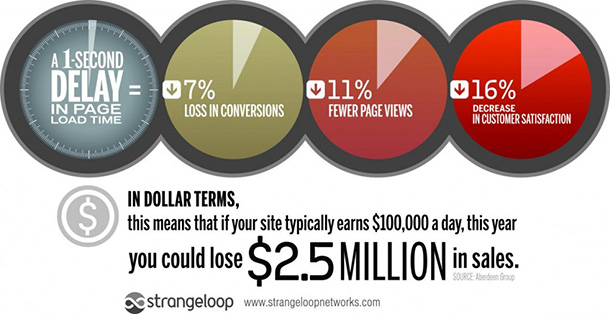
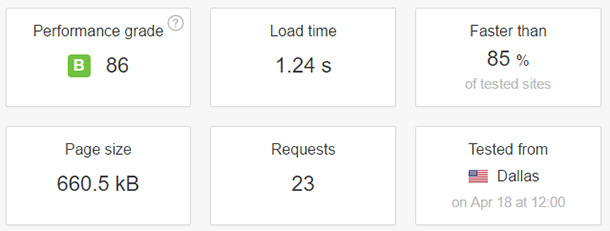

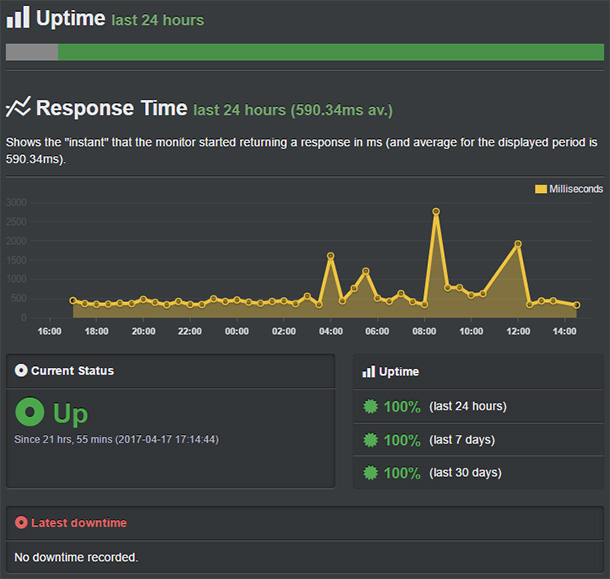






 YALDA NASIRIAN Mar 21, 2020: Support team are really amazing; they are professional and solve my hosting issues very quick. Highly recommended for hosting provider!
 DB MCNICOL Mar 4, 2020 : I’ve been using BlueHost since last June, based upon 1) the recommendation here, 2) the ability to lock in 3 years at a low rate, and 3) the reasonable monthly fees after that.As a new WP user, I had a big learning curve initially. Several chats with support on various issues and they were all resolved quickly. I haven’t had to contact them in over six months.I’ve had one major (reported) and one minor (back up before I could worry about it) outage. Performance has always been good. I currently have 4 live sites with them, opps, no, 5, and all with email. No issues.
 SHIVA MOHAMMADI-JAM Jan 27, 2020: I have been using Bluehost for more than two years to host our own organization’s domain. I found it super fast, reliable and cost-effective. Also, it is easy to use, even for beginners. More importantly, the support is fast and competent.
 GEOFFREY NWACHUKWU Jan 20, 202: Bluehost made it very simple for me to migrate my existing WordPress website with their beautifully designed interface and tooling.Moreover the speed of the site has improved drastically.Well done
 EDGAR DANIEL RUIZ SANTIAGO Jan 20, 2020: Amazing customer service and good prices
 VALERIE PITALUGA Jan 20, 2020: We run multiple sites and use a competitor for one of the sites where we have no option (decision made by the board of directors) so I can confidently say that Bluehost far supersedes its competitors and provides a better value for web hosting and associated services
 NORMAN JUTIE Jan 19, 2020: I’m from the Philippines and I use Bluehost because it’s easy to use and affordable, There are plenty of exciting features and extras included at every price point, and the diversity of plans provides a lot of flexibility for every budget Bluehost is literally one of the top few that I would recommend to anyone and everyone.
 KRISTINA FORREST Jan 18, 2020: I love using Bluehost for my web hosting service. They are easy to contact and provide excellent service. Can’t recommend enough.
 LISA MACY Jan 18, 2020 : Just over a year ago I decided to change my blog only site on WordPress to a WordPress/Woocommerce site. I looked at a few different hosts and ultimately chose Bluehost to be the host of my website. While I was building my website (which I hadn’t a clue how to do), they were very helpful, and anytime I have an issue (which is very VERY rare), they are very helpful. They have anything and everything you need to start from scratch with a website like I did, so don’t hesitate to go with them as your host!
 ALI ARSHAD Jan 18, 2020 : The best Hosting company I met ever met in my online career. BlueHost played a big role in ranking my websites to the top google’s page.
 DANAJan 18, 2020: Im so greatful for bluehost, i have read only positive reviews and recommandations. All navigation is super simple and eventhough i have always counted myself as PC illitarate with all the help and bluehost guidance im actually doing this. Even Beginner can build his website with bluehost. I have more ideas for websites and I will deffinitely be using bluehost again. Big thumbs up, 5 out of 5,
 NICHOLAS GITHINJI Jan 17, 2020: Bluehost support, whether via chat or call, is really great, supportive and timely. However, sometimes the cPanel has glitches when setting up hosting but it’s very rare. Usually, I use Shared Hosting but I recently bought VPS and am eager to see how the site performs. So far so good! Overall, Bluehost is dependable seeing as it hosts 90% of my sites.
 JESS SPOTO Jan 17, 2020: I have been using Bluehost for my business site for the last twelve months, and recently renewed my plan with them.Bluehost made it easy to get started online, and I appreciate their helpful emails. I would recommend them to other small business owners looking for a reliable host.
 ROB RICE Jan 17, 2020: Great support. Feel very confident when I have any questions I look forward to speaking to customer support
 IVET FORTUN Jan 17, 2020: I love using Blue host! It’s easy for me to use even with my very limited technical skills. I also appreciate that I can have several tools for my website in just one place. All of these benefits come together at an incredible price. Thank you Bluehost!
 HELEN WAGNER Jan 16, 2020: Blue Host is very responsive to my questions. Someone at the helpdesk (sorry I can’t remember who) was helpful with my question re garding my web site.
 JAY Jan 16, 2020: Well, to be frank, the most feasible and reliable for Webhosting service I ever had. for me, the support platform is totally awesome and anyone from non-technical to technical person each and every query solved by the support team.I also purchased the GoDaddy platform but from my own experience, I will say if u r going for WordPress hosting, then this is THE best!love from India and happy new year!
 MELISSA B Jan 16, 2020: I have been using Bluehost now for 9 months. I am new to websites and design. After reading many reviews and looking at other hosting sites I decided on Bluehost and I am sure glad I did! Everything has been running well and I am really finding it easy to learn. Support has been excellent ! I recommend Bluehost for all of your Needs.
 RENE ALTERMATT Jan 16, 2020: I started with BlueHost for my new website and I’m very happy with the Product.
 SHAHAN Jan 16, 2020 : Bluehost is the best website for creating lots of things.
 CHAN HAY MAN Jan 15, 2020: I think Bluehost is okay. On the upside, the interface is intuitive and easy to use, the 24-hour support is very helpful, the price is unbelievably low, the integration with WordPress is seamless, the basic mail service is easy to use.On the downside, the server has gone down twice (ard 2 hours and ard 15 minutes) during this first month I launched my website, the support does not respond very quickly but gets automatically disconnected if you do not reply within a few minutes, and the speed is just average.
 MOSTAFA DEHKANI Jan 15, 2020: Great service and great support, really recommend blue host.
 PEARL Jan 15, 2020: I use Bluehost to host my personal blog. I have had no issues at all with Bluehost. I use WordPress, and Bluehost has a great deal with them, so it’s incredibly affordable. I haven’t had to contact their customer service yet, but whenever there is something that I’m not sure how to do, their online tutorials or explanations are always pretty clear. Looking forward to continuing to use Bluehost!
 ANA STEFANI PARKER Jan 15, 2020: I purchased BlueHost last year when I decided to start my own WordPress business website. BlueHost simplified the process and gave me several helpful tools to help me in setting up my website . I’ve had no technical issues over the past year that I couldn’t resolve within a few minutes. Whenever new websites or bloggers ask me how to set up, I always point them to BlueHost.Xo ,
 LINDA VU Jan 15, 2020: Very easy to use and great value for my blog and an overall great platform to use. I would highly recommend!
 HANNAH BARTON Jan 15, 2020: I’ve been a Bluehost customer since May 2019, and my experience thus far has been great. I’ve had literally zero problems, and love that wordpress is included. It’s been a great hosting service for my blog, and I anticipate that I’ll be a satisfied customer for quite a while.
 REY JOHN LORCA Jan 15, 2020: Bluehost is my first hosting site and is instrumental in helping me grow my company. It is easy to navigate through its interface. As personal experience, even if I am not an IT expert, I was able to build my website using Bluehost. They offer variety of learning options and the team go beyond a extra mile to support their users. Thus, keeping me stay with Bluehost.
 DEE GOTT Jan 15, 2020: I have been with Bluehost for the past year and I have enjoyed my experience. When I have ever had a problem which was not that often, the tech team was right on it and cleared up on the first visit. I have since migrated to WordPress Pro and have finally got things the way that I want them. The team worked overtime, in my opinion, to make everything perfect for me. As with anything, bugs happen and they certainly know how to get rid of them. Thank you, Bluehost for all your efforts!
 NICHOLAS DUECK Jan 15, 2020: I simply have been loving Bluehost for the past year. It makes working with WordPress very seamless and easy. If you’re looking for a very cohesive product I highly recommend the two products. No complaints so far!
 HEATHER SEYHUN Jan 15, 2020: Bluehost has been an easy way to create an online presence!
 SHELLEY CRAIG Jan 15, 2020: Bluehost support overall is very good for the cost involved. They helped with a difficult issue when I was launching an author’s website for their first book. Days before the book launch the site had issues because of some server maintenance issues. The Bluehost team worked diligently to find the problem and get us ready for launch. The book launch was a success and the book became a #1 best seller on Amazon.
 MAN YEE KEUNG Jan 15, 2020: Bluehost is great so far! I purchased a discounted Bluehost subscription a few months ago through an affiliate link. I found Bluehost because after searching for hosts for my website, Bluehost came up as one which was highly reputable and very easy to manage. I have not launched my blog yet, but Bluehost has not given me any issues at all thus far. There are numerous features and a helpful checklist to get my blog up and running. I love the look of my blog already, even though I don’t have any experience building websites.
 ANDRIUS GUDAITIS Jan 15, 2020: Iam very happy with account, easy to use, speed good. Has excellent customer support with any issue
 JOYCE DERENAS Jan 15, 2020: I’m delighted with Bluehost for managing my WordPress website. As I continually learn more about running an efficient site, Bluehost has more than enough services and 3rd party add-ons to make me happy.
 IRENE MARTIN Jan 15, 2020: Really easy to build a website with BlueHost and WordPress, lots of tutorials online. I have no background on building website and had mine running in 5 days. Great tool.
 ALAN SNELSON Jan 15, 2020: Bluehost and WordPress beginner helped me to get a complex website on line in a fairly straightforward way. Although I had created several websites using a variety of software I was a complete beginner with WordPress. Without the guidance and support of Bluehost I wouldn’t have had much idea how to get things set up. The hosting has been super reliable too, with no discernible downtime and all for a very reasonable cost.
 ELFADIL ABDALLAH BAKER Jan 15, 2020: Bluehost is awesome for me, it has cool tools all tool in one place for use when you need it, This helps me gain time and complete all tasks quickly and easily.
 DAN LOVALLO Jan 15, 2020: I switched my domain from Namecheap, including EasyWP to Bluehost, where my domain and WP now rest. The transition was seamless and Bluehost has been terrific, when it comes to support. I hope to remain with Bluehost for a longtime.
 IMAD ABOU JAOUDE Jan 15, 2020: Best Hosting Company online!
 HARSH MANKAD Jan 15, 2020: My experience with Bluehost has been very positive from setting up my website hosting to the support I received for developing and launching the site. I’m very happy with my decision to go with Bluehost!
 GIVEN HOFFMAN Jan 15, 2020: With Bluehost setting up a website was so easy. Phone assistance from Bluehost was great. They helped me through a couple issues I had with WP that they totally didn’t have to help me with but did anyway. I have been so pleased with their customer serve, their pricing, and their hosting.
 KOMAR ADRIANT Jan 15, 2020: So far, i like bluehost, better than my previous provider. provide an easy control panel to learn and use even for new user, have a useful feature, good performance and helpful (documentation and customer service). Simply i feel happy and satisfied from all aspect because it meet my expectation of a professional provider
 JENNIFER HAMMJan 15, 2020: I had always wanted to start a blog, but had no idea where to start. With no experience with creating websites I was a little intimidated. However bluehost made it easy. Everything was laid out in an understandable format and all the tools I needed where right at my fingertips. I am now up and running and I couldn’t have done it without bluehost. I couldn’t imagine creating my content using any other host out there.
 TOM MERRETT Jan 15, 2020 at 12:42 pm Bluehost offers great functionality and customisation options. I wouldn’t choose any other platform
 MEGAN FLYNN Jan 15, 2020: I’ve been using BlueHost for the last couple of years for a couple of different projects, most recently to launch my own company. I chose them after an extensive, careful review of all the various options out there—specifically those that work best with WordPress. I’m so glad I chose BlueHost, and I recommend it to all of my clients. It’s affordable, their support team is responsive, and their services work beautifully with WordPress!
 SARAH HULL Jan 15, 202: I was looking for a new hosting company as my existing I felt was continuously throwing advertising and making it more and more convoluted to move around in my control panel.
 TARA FREELAND Jan 15, 2020: BlueHost has been easy to work with and dependable, definitely recommend for website hosting. Two thumbs up.
 SARAH CHUNG Jan 15, 2020: I moved from GoDaddy to BlueHost, I found that BlueHost understand the customers’ emotion, wants, and needs. They are passionate, flexible and have compassionate. I also paid for the BlueSky, employees are knowledgeable and patience. I strongly recommend BlueHost.
 MIKE BRAILEY Jan 15, 2020 : I have been using Bluehost for more than a year to host a number of client sites. The platform is reliable and the support team (who helped me in the early days) were knowledgeable and keen to assist. I recommend Bluehost as a comprehensive partner for anyone considering setting up a WordPress website.


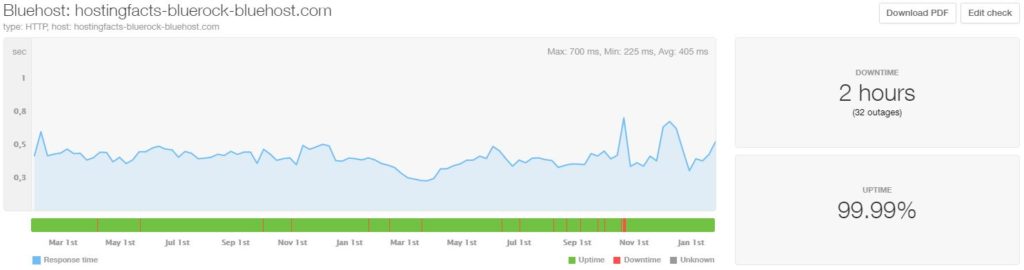

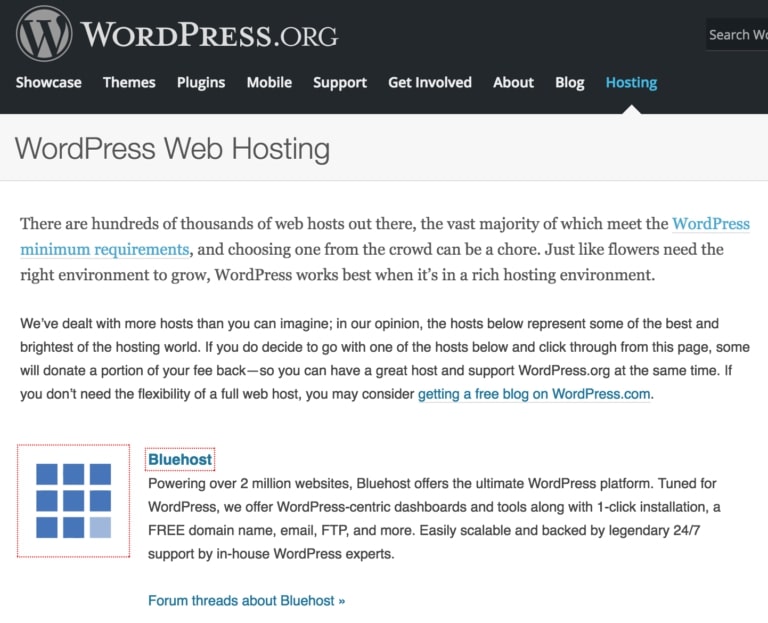
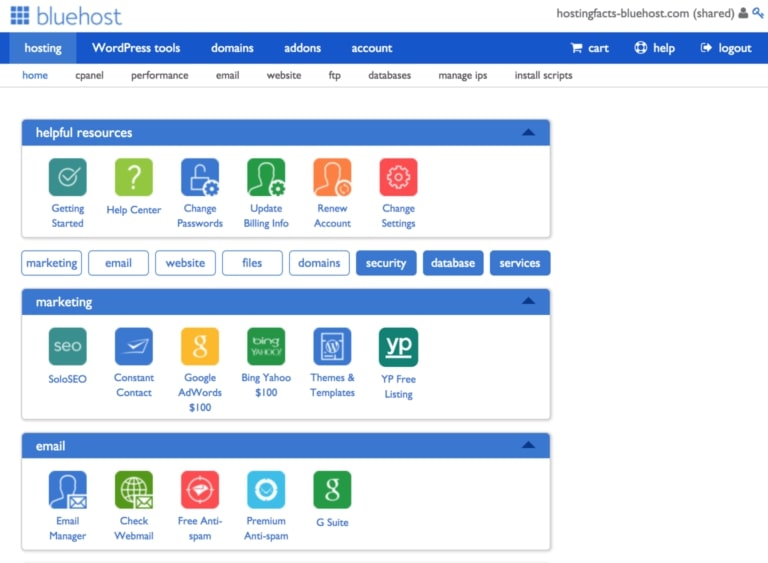
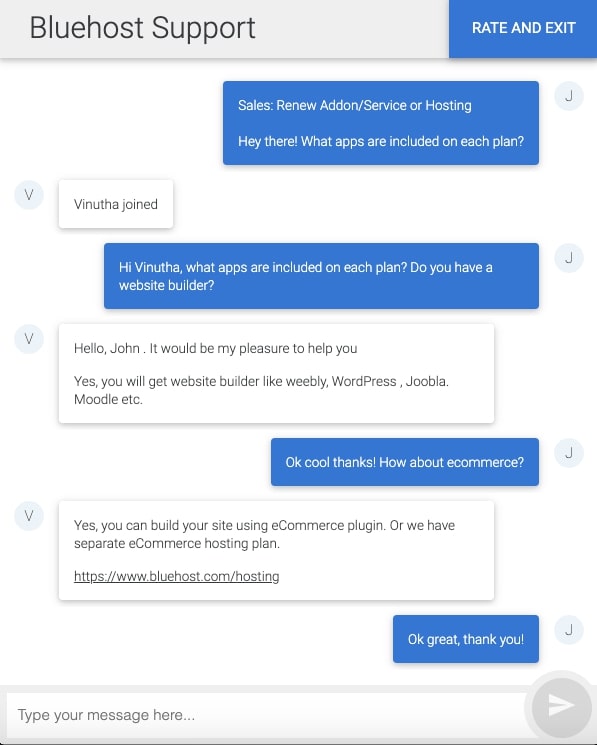

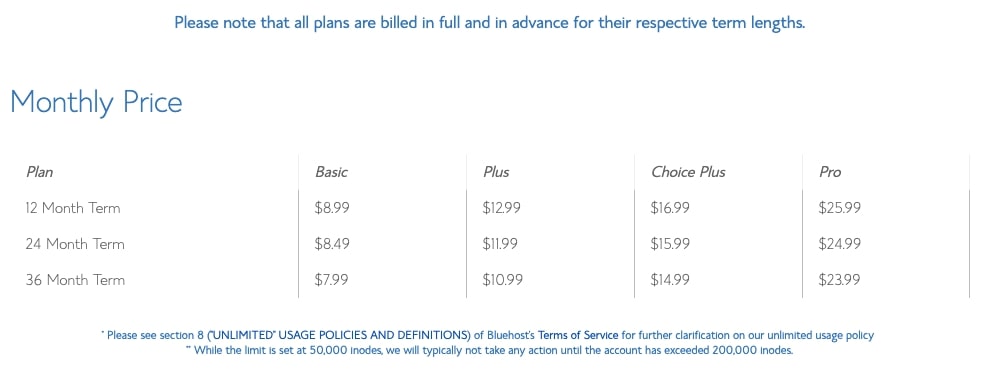
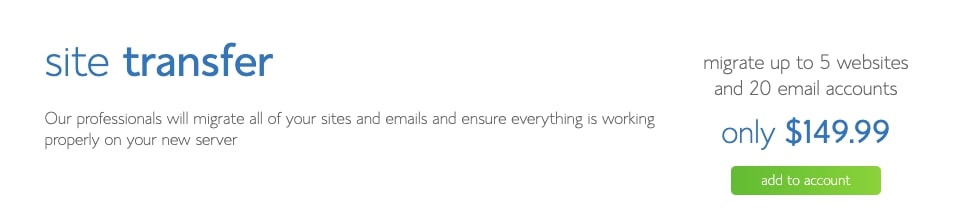
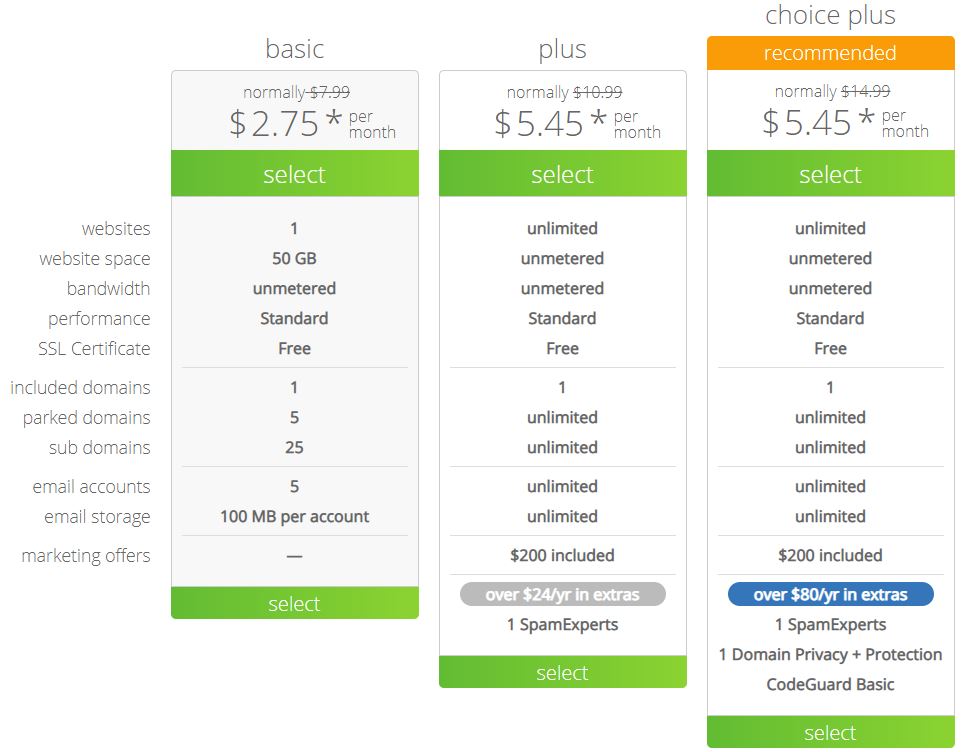




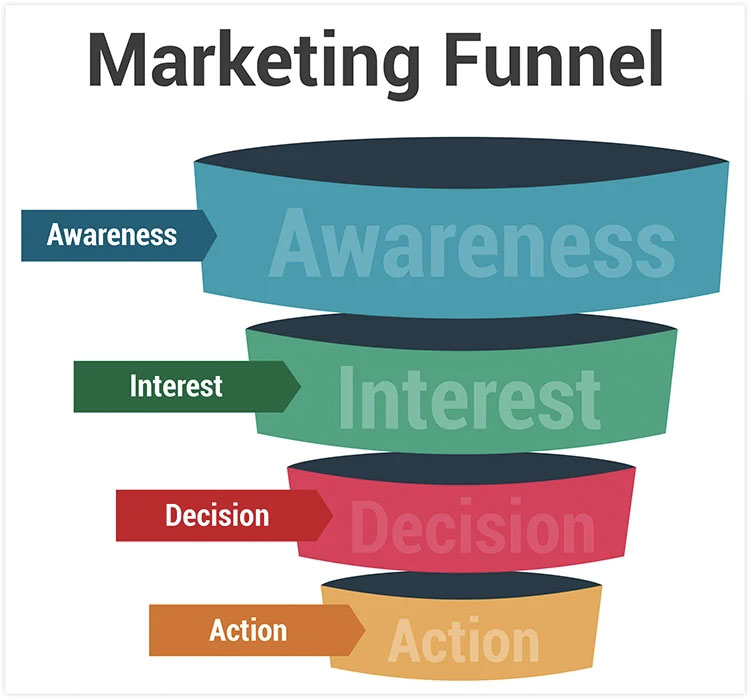


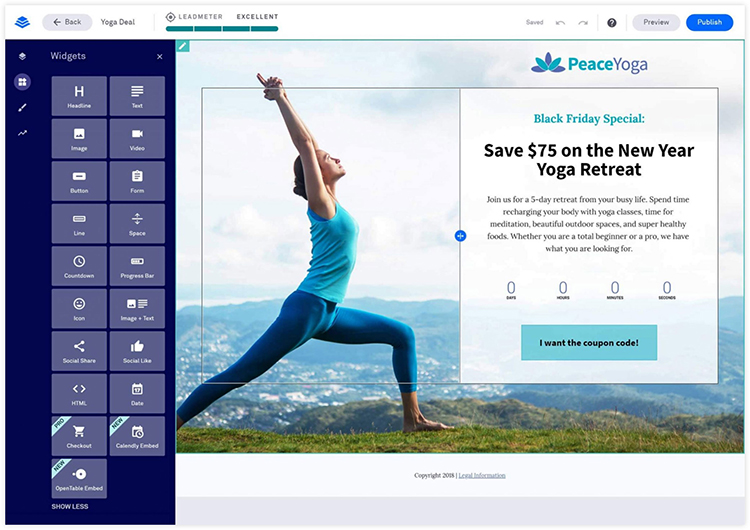
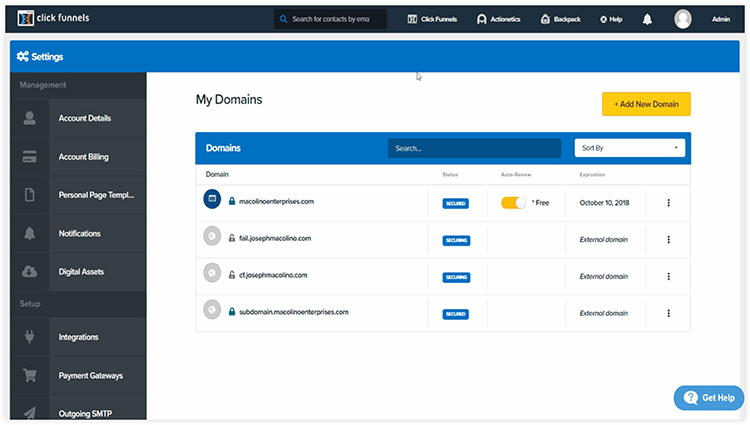
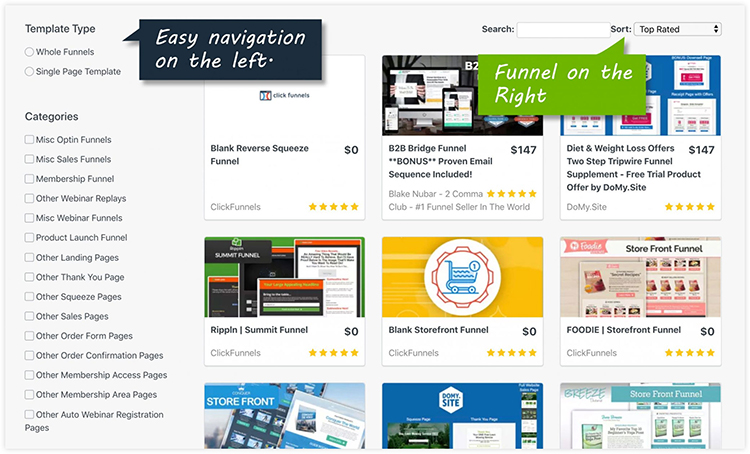
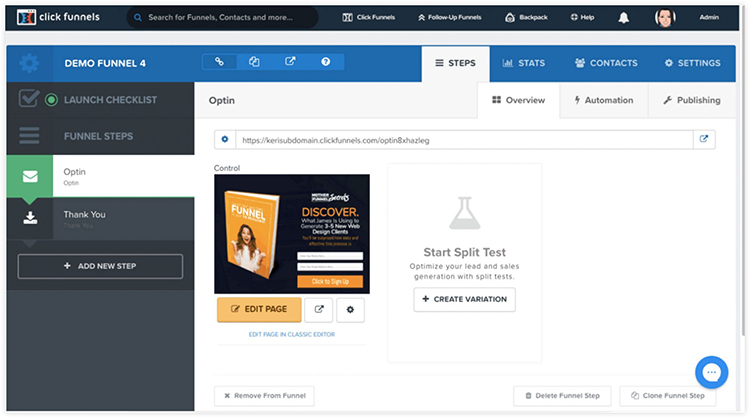
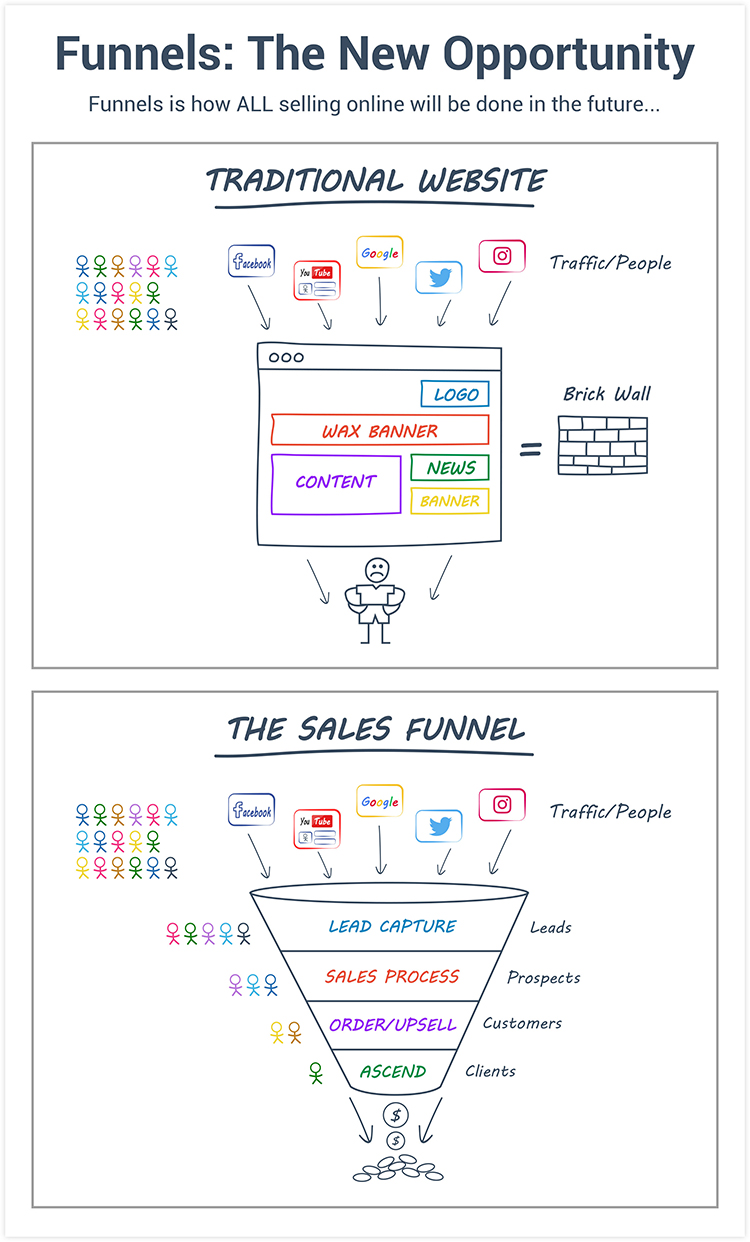
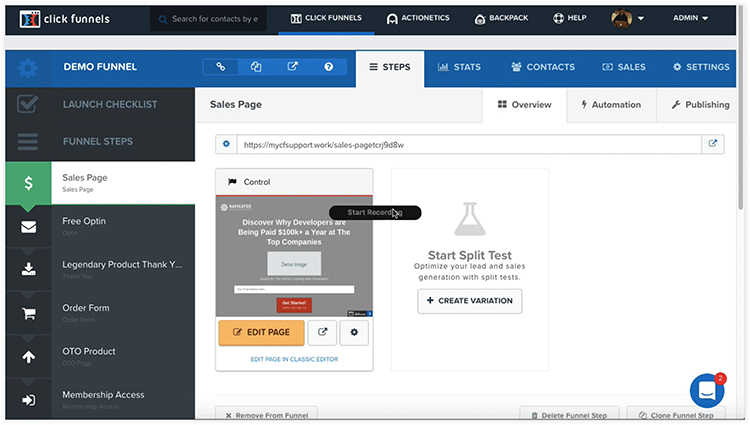
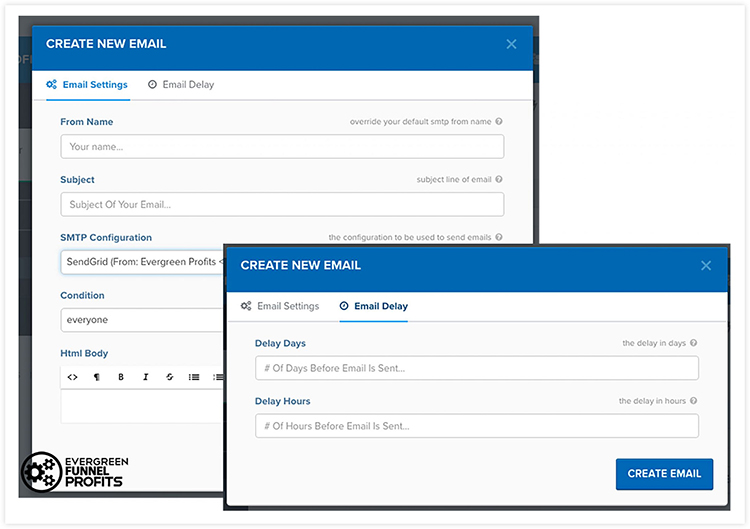
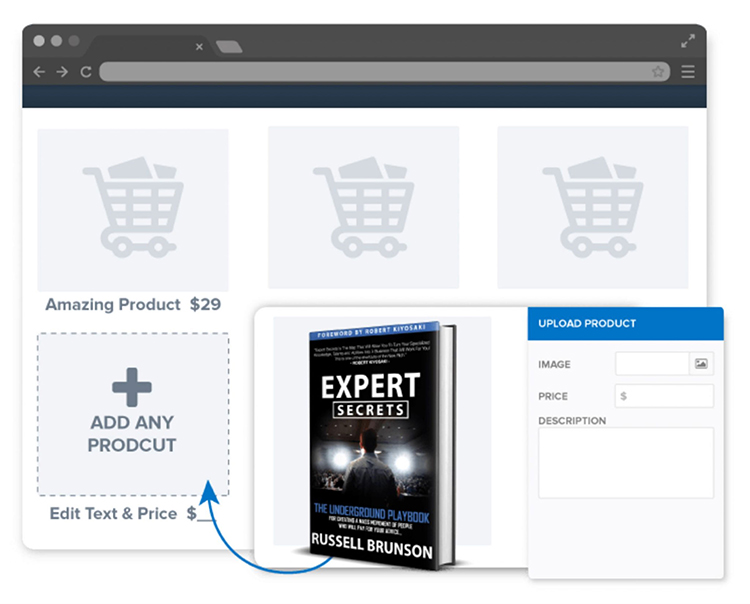

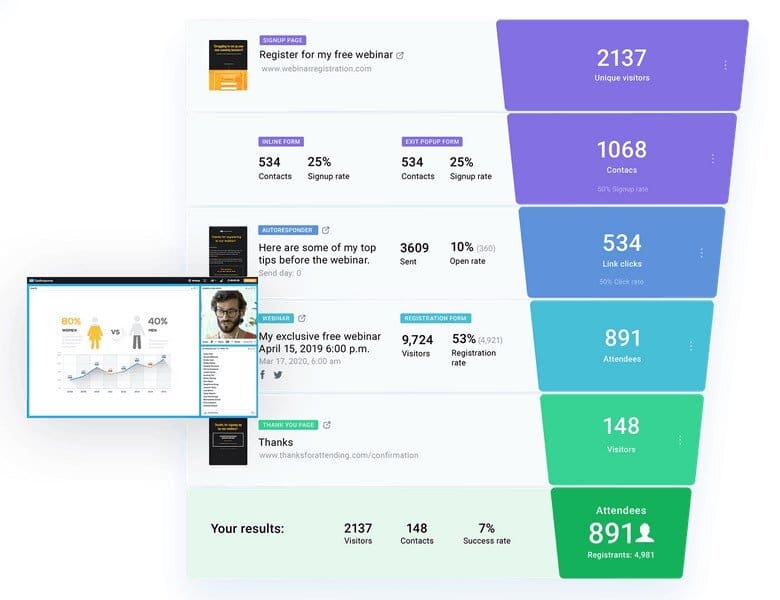
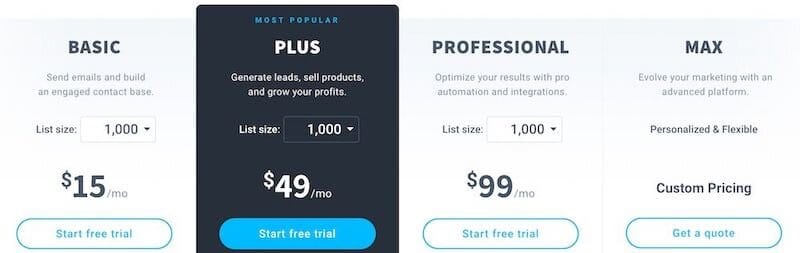
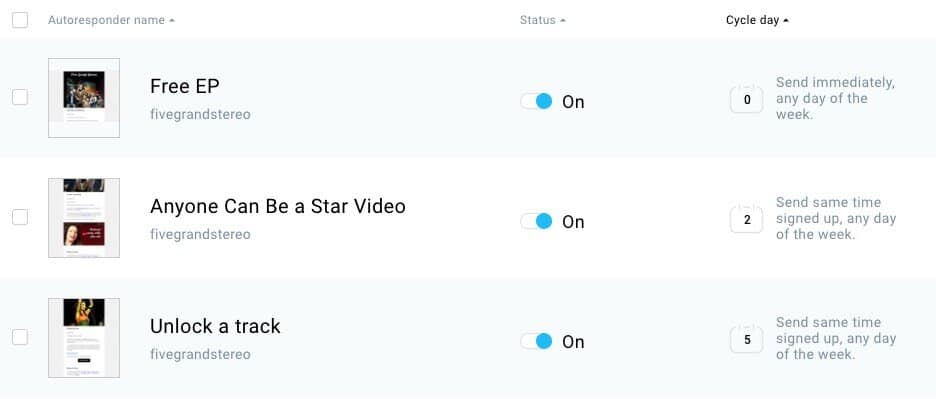
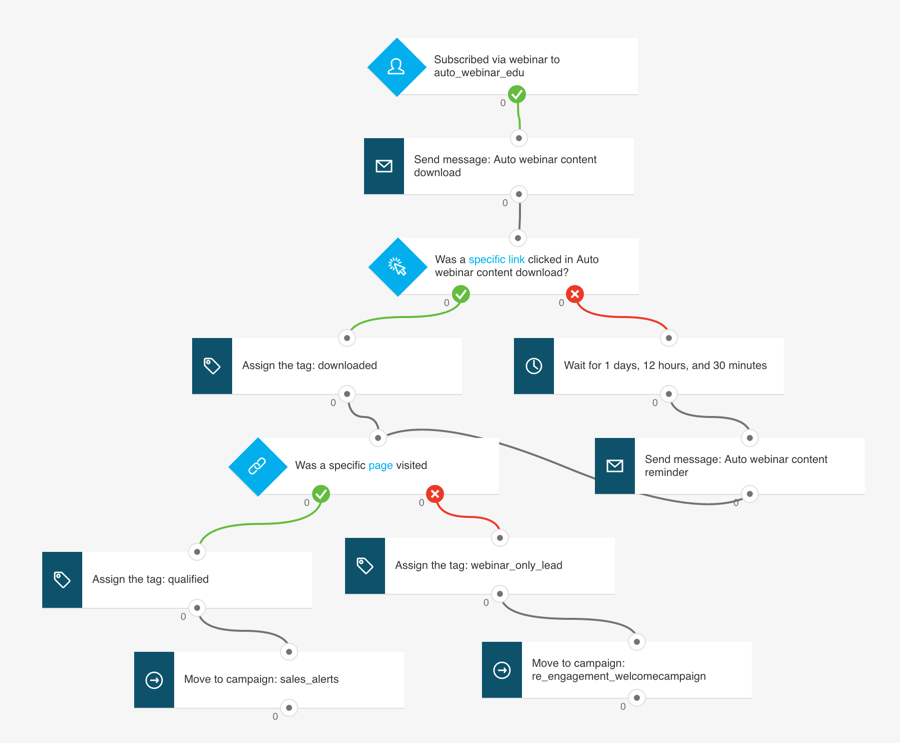
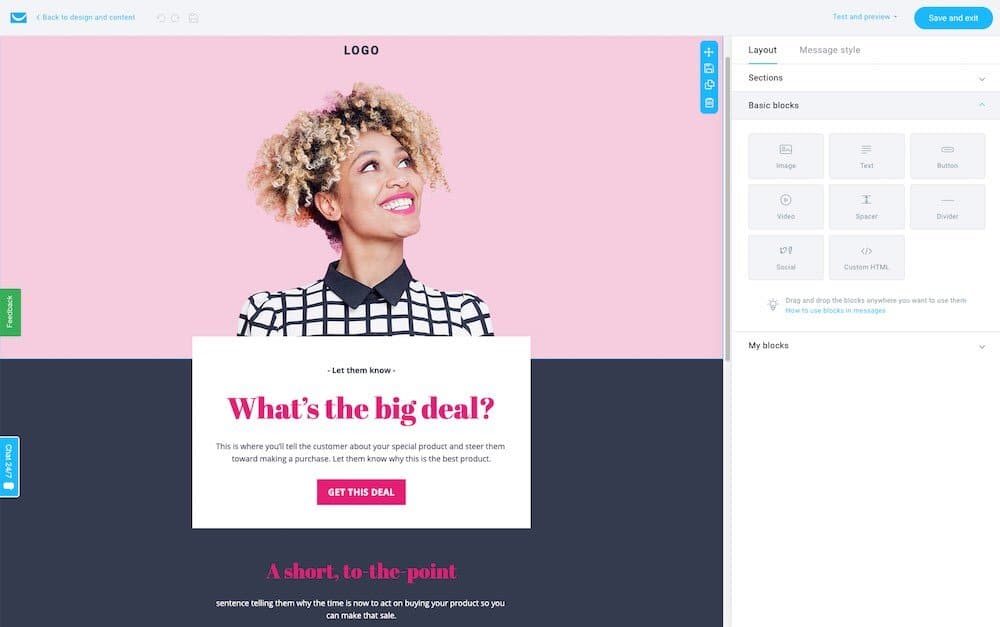
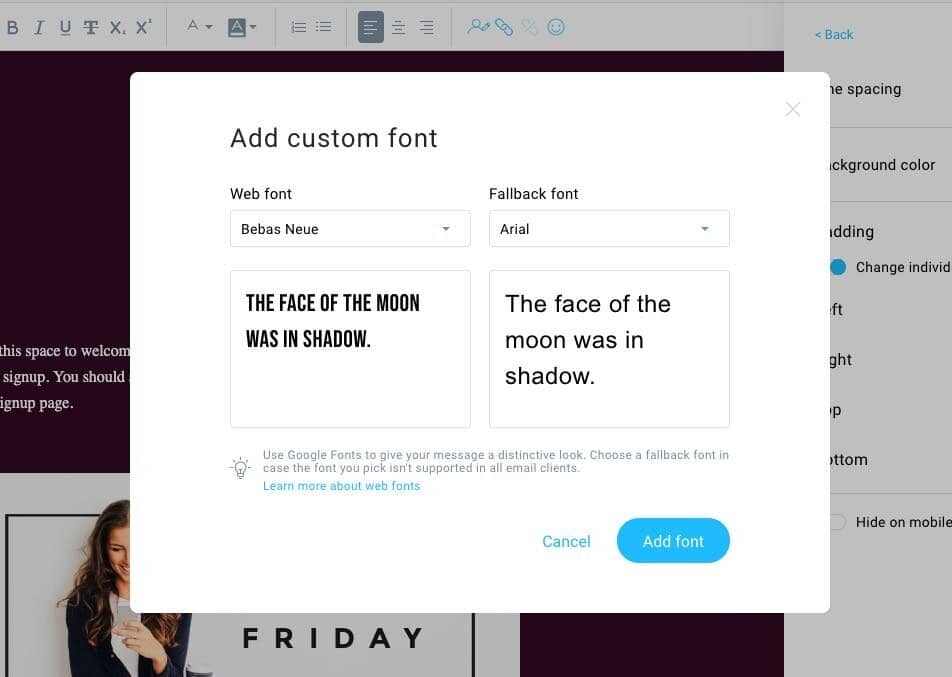
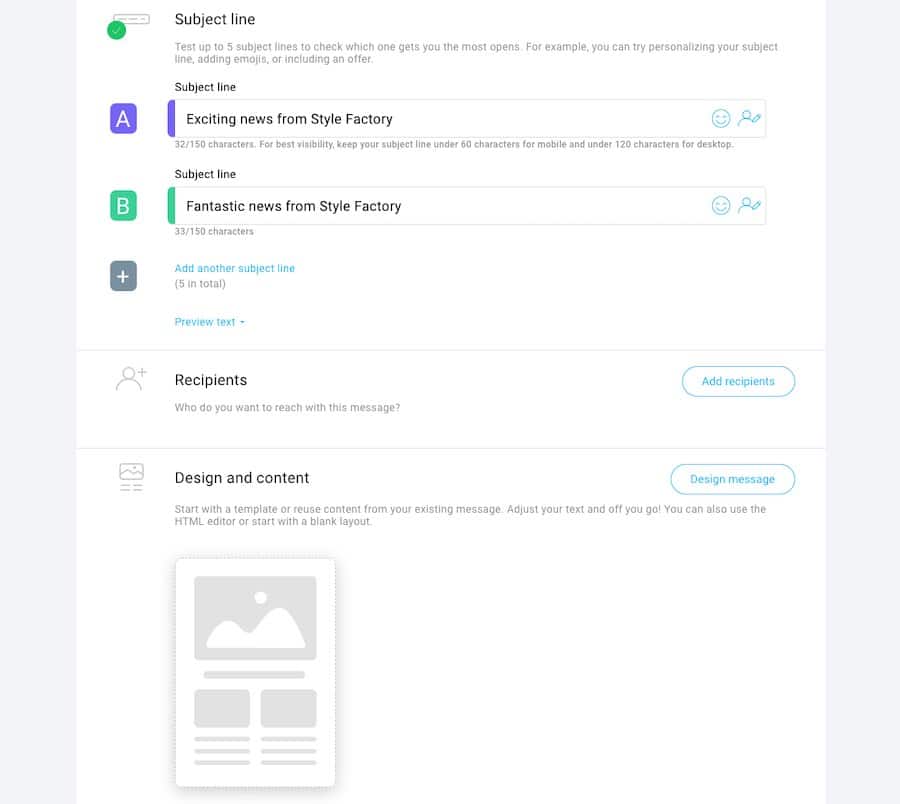
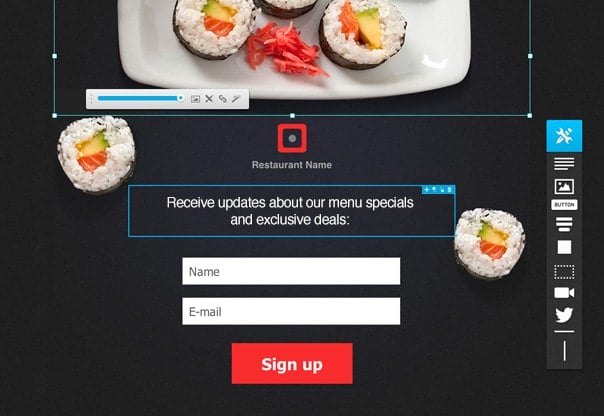
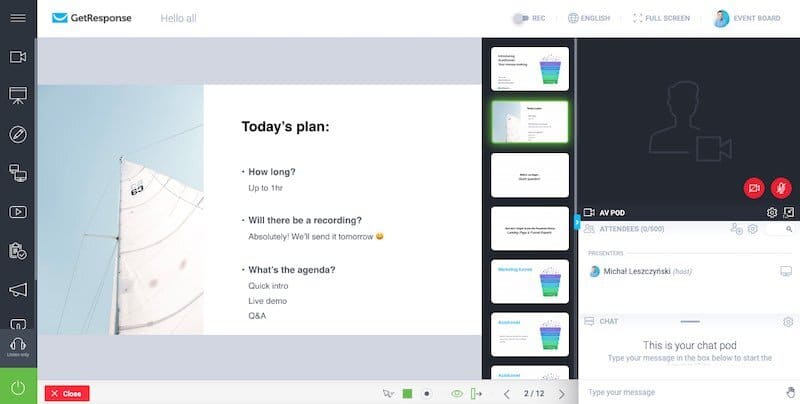


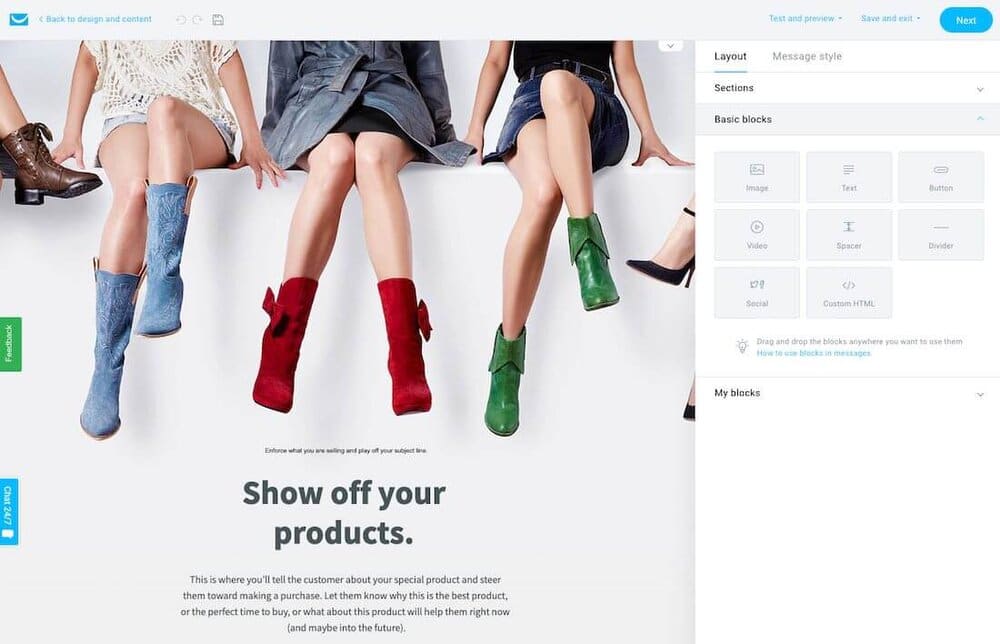
 Business Review